


Doximity Scribe Review (2026): Price, EHR Fit and Privacy
Who can use Doximity Scribe for free, how its notes reach the chart, and what its 29-day deletion rule means for your records.
Written by the Commure Scribe Team
Published: October 2, 2026
•
11 min read
Updated October 2, 2026
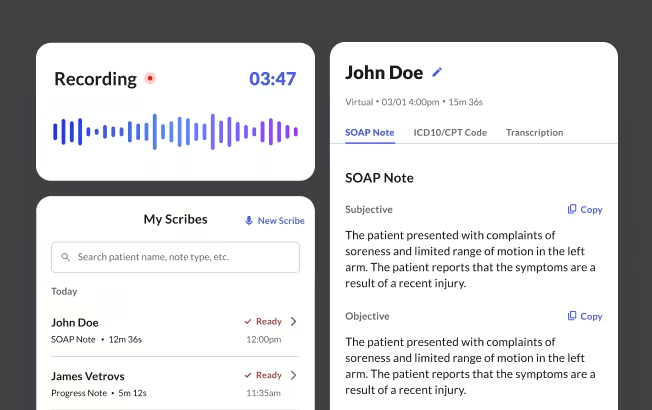
Doximity Scribe is a free AI scribe for verified US physicians, nurse practitioners (NPs), physician assistants (PAs) and certified registered nurse anesthetists (CRNAs). It drafts the note from the visit, moves it to your EHR by copy and paste, and deletes notes and transcripts after 29 days.
What You Need to Know About Doximity Scribe
- Nurses, therapists, dentists and other clinicians can't sign up on their own, and individual clinicians have no paid tier to upgrade to.
- Copy each note into your EHR before day 29, since the help center documents no direct write into any EHR.
- Try it on a full clinic day and time the copy step, since that is where the minutes go.
What Is Doximity Scribe?
Doximity Scribe is an AI scribe that listens during a visit and drafts the note, so you can keep your attention on the patient.¹ You pick a note type, start recording on your phone or computer, and review the draft when the visit ends. It also takes plain dictation, and it runs inside Doximity Dialer voice and video calls for telehealth visits.²
Doximity launched Scribe in July 2025 as a free tool for its verified members.³ The note is generated by OpenAI's GPT-4o, and Doximity holds its own business associate agreement (BAA) with OpenAI.⁴ A session can run up to 140 minutes, and you can pause and resume it.⁵
Three limits shape how it fits into a clinic day. Notes reach your EHR by copy and paste, and only certain clinician roles can sign up on their own. Doximity also deletes each note and transcript after 29 days.⁶
Who Should Choose Doximity Scribe?
Doximity Scribe fits a verified US physician, NP, PA or CRNA who wants an ambient scribe at no cost. The trade-off is pasting each note into your EHR within 29 days. Clinicians who already use Doximity Dialer for telehealth get the most from it, because Scribe runs inside those calls.² Practices that need write-back, coverage for therapists and staff, or a lasting copy of each note should compare other options first.
Free and paid ambient scribes, scored on cost, trials and EHR handoff, are ranked in the guide to the best AI medical scribes.
Is Doximity Scribe Free?
Doximity Scribe is free for verified Doximity members, with no paid tier for individual clinicians.¹ Signing up takes a verified account in one of four groups of US clinicians and students:
- US physicians
- Nurse practitioners and physician assistants
- Certified registered nurse anesthetists
- Medical, NP, PA and CRNA students
Doximity verifies members at registration. Clinicians without a medical-domain email may need to send extra documentation.⁷ Nurses, therapists, dentists and other clinicians can't sign up on their own.
Organizations can buy Scribe as part of Doximity's Clinical AI Suite, which bundles it with Dialer and the Doximity Ask assistant. Doximity reported in June 2026 that 150 health systems had bought the suite, at enterprise prices it does not publish.⁸
Costs across paid scribes are compared in the guide to AI scribe pricing.
How Do Doximity Scribe Notes Get Into Your EHR?
Doximity Scribe notes reach your EHR by copy and paste. The help center describes the finished note as "ready to be pasted into your EHR."¹ You can copy it from the phone app or the website. A native desktop app for Windows and Mac, released in June 2026, puts the note on the same screen as your EHR.⁹ The product page says you can "send it directly to the patient's chart," but the help center documents no direct write for any EHR.¹⁰
Doximity's enterprise page lists "Epic, Haiku and other integrations" for organizations that buy the suite, without saying whether Scribe notes write into the chart.¹¹ Doximity has also announced that Scribe will sit inside Aledade Assist, Aledade's EHR overlay, with no EHR named and no date given, and the overlay reaches only clinicians in Aledade's network.¹²
The 29-day window turns the copy step into a deadline. Doximity says, "Be sure to copy your notes to your EHR before then."⁶ Copy each note on the day of the visit. During the first week, time the whole path: copy the note, open the right patient and encounter, paste each section and sign. That total shows how much time the scribe returns. How write-back differs from copy and paste is explained in the guide to EHR integrations.
Is Doximity Scribe HIPAA Compliant?
Doximity says Doximity Scribe is HIPAA compliant.⁶ HIPAA generally requires a BAA with any vendor that handles your patients' health information on your behalf. The U.S. Department of Health and Human Services (HHS) names transcription vendors as one example.¹³ Doximity's BAA is part of its Terms of Service and takes effect when you accept them at registration.¹⁴ It applies when you are a HIPAA covered entity and send patient information through Scribe.¹⁵
The help center spells out what happens to the data.
- Audio. It is encrypted and "immediately destroyed as soon as it's transcribed."⁶
- Notes and transcripts. Both are encrypted and deleted automatically after 29 days.⁶
- Staff access. Doximity says its employees and technology partners cannot access Scribe note data.⁶
Doximity's security page describes its platform as "SOC 2 Type 2 and HIPAA/HITECH certified."¹⁶ HHS does not require, issue or recognize HIPAA certifications, so the phrase refers to a private assessment rather than a government credential.¹⁷ Doximity publishes no Scribe-specific statement on model training. Its BAA lets it process patient data with AI tools to "improve" its services, and use de-identified data "for any lawful purpose, including product development."¹⁴ Ask Doximity directly if your compliance team needs a written answer.
Consent is the clinician's job under Doximity's terms. You "must obtain consents from all individuals whose communications may be transcribed or summarized," in person or on Dialer.¹⁵ State recording laws vary. California, for example, requires consent from everyone in a private conversation.¹⁸ Dialer patients hear or see a notice that the call is being transcribed.² What a BAA should cover is laid out in the guide to HIPAA-compliant AI note-taking.
What Note Types and Languages Does Doximity Scribe Support?
Doximity Scribe ships seven built-in note types, and you can build your own on the website.¹⁹ The built-in list is H&P (history and physical), progress note, consult note, meeting note, telephone encounter, video encounter and dictation only. A community library holds templates shared by other verified clinicians. A Doximity medical fellow reviews each one before it goes live.¹⁹ Six oncology templates were added in May 2026.²⁰
Doximity says Scribe "supports over 50 languages."¹ Non-English visits run on a separate model that takes longer to process.⁴ That helps if you see patients in Spanish or another language and want the note drafted from the original conversation.
Pre-charting arrived in June 2026.²¹ With it, you load prior visits, referral letters or intake forms before the visit, and that context carries into the note.²² On the website, you can refine a finished note with preset or custom edits. One preset, "Add Billing Codes," adds billing codes to the note, though Doximity does not say which code sets it uses.²³ In September 2026 Doximity moved these edits into an Ask sidebar next to the note.²⁴
Does Doximity Scribe Work for Group Practices?
Doximity sells Scribe to organizations through its Clinical AI Suite enterprise plan, listed for large practices and health systems at an unpublished price. That plan lists single sign-on, automated user management, usage reporting and care team access.¹¹ Personal accounts list no group features.
A smaller group that doesn't buy the enterprise plan leaves each clinician on a personal account. Each clinician copies their own notes into the EHR, keeps to their own 29-day window, and builds or borrows their own templates. On personal accounts, staff outside the eligible roles cannot use it.
What Does Research Say About AI Scribes Like Doximity Scribe?
No study indexed in PubMed has tested Doximity Scribe itself.²⁵ Studies of other ambient scribes found lower burnout, less time in notes and errors in a small share of drafted sentences, so every draft still needs a careful read.
The burnout study compared the same clinicians before and after, so other causes can't be ruled out. In the multisite study, the largest gains went to clinicians who used a scribe in at least half their visits.²⁸ A free scribe returns time only on the visits where you turn it on.
Drafts still need a careful read. A 2025 study had clinicians review GPT-4 notes drafted from simulated primary care consultations. They found made-up content in 1.47% of sentences and missing content in 3.45%.²⁹ Doximity's own help text warns of "occasional inaccuracies."⁴ Read every draft before you sign it, and give medication changes and the plan the closest look.
What Are Doximity Scribe's Gaps?
Doximity Scribe has five gaps that can affect a clinician's day or a practice's rollout.
- No write-back on personal accounts. Every note is copied and pasted into the EHR by hand.¹
- Notes deleted at 29 days. Your EHR becomes the only lasting copy of each note.⁶
- Eligibility limited on personal accounts. Physicians, NPs, PAs, CRNAs and students can sign up, while therapists, nurses and other staff cannot.¹
- Group features only on the enterprise plan. Single sign-on, user management and care team access come with a plan priced by quote.¹¹
- No Scribe-specific training policy. Doximity's BAA allows AI processing of patient data to improve its services, and it names no limit for Scribe.¹⁴
How Does Commure Scribe Fill Doximity Scribe's Gaps?
The training and 29-day deletion gaps close at any practice size with Commure Scribe. The EHR gap closes once a practice reaches group size.
Getting notes into the EHR. At one to five providers, Commure Scribe also uses copy and paste, from a Chrome extension overlay that sits over the EHR. So a solo physician moves notes much as they would with Doximity Scribe. Medium and large group practices can get one-click sync with the EHR, which removes the paste step. Commure Scribe lists 60+ EHR integrations, including eClinicalWorks, plus athenahealth.
Who can use it. Commure Scribe is sold to practices of all sizes, from solo clinicians to large groups, rather than to members of a network. It works across a wide range of specialties, including behavioral health, dentistry and physical therapy, among others. Group plans are priced by quote, as Doximity's enterprise plan is.
What happens to audio and notes. The two tools take opposite approaches. Doximity destroys audio after transcription and deletes notes at 29 days. Commure Scribe keeps audio encrypted and uses it only to generate the clinical note, never for AI training. Audio stays active for one year by default, then is archived for at least six years. Clinicians can permanently delete transcripts and notes at any time. A clinician who wants nothing kept may prefer Doximity's approach, while a practice that needs an archived record for compliance may prefer Commure's.
Work around the note. Commure Scribe generates suggested ICD-10 and CPT codes in a separate tab for the clinician to check. AI Copilot drafts documents that follow from the visit, such as prior authorization requests, work excuse letters and patient emails. Commure Scribe is SOC 2 certified and HIPAA compliant, with data stored onshore, and live phone support is available during setup and after.
Doximity Scribe has advantages of its own. It costs nothing, allows 140 minutes per session against Commure Scribe's two hours, and runs inside Dialer telehealth calls. Commure Scribe's one-click sync and admin controls are also gated to higher tiers. A solo physician who pastes notes the same day may find Doximity Scribe enough. A practice that needs notes kept past 29 days, or notes in the chart without pasting, may be better served by Commure Scribe.
More AI Scribe Reviews and Guides
These guides cover the scribes and questions that come up when weighing Doximity Scribe.
- Pricing tiers, note quality and EHR compatibility are covered in the review of Freed AI.
- Note quality and specialty support are covered in the review of Heidi Health.
- How ambient scribes draft a note and what the clinician reviews is covered in the explainer on the AI medical scribe.
- The scribe role, from in-person scribes to ambient AI, is explained in the guide to what a medical scribe does.
- Dictation tools, from Dragon to AI apps, are compared in the guide to medical dictation software.
- Traditional transcription, and how it compares with ambient AI scribes, is covered in the guide to medical transcription.
- The SOAP note format, and how AI scribes draft it, is covered in the guide to SOAP notes.
Copy the note before the clock runs out
Commure Scribe is one to test on the same kind of day you gave Doximity Scribe. It fits practices that need notes kept past 29 days or one-click sync at group size. Time each note's path into the chart with both tools. The trial and plans are listed under Commure Scribe pricing.
Doximity Scribe details in this review were checked against Doximity's own pages on September 30, 2026. Features and terms change, so confirm current details with Doximity before you rely on it.
This article is for informational and educational purposes only, does not constitute legal, medical, or professional advice, and does not guarantee any particular documentation, privacy or compliance outcome.
Frequently Asked Questions
Yes, for eligible members. Doximity Scribe is free for verified US physicians, NPs, PAs, CRNAs and students in those programs, with no paid tier for individual clinicians. Health systems buy it as part of the Clinical AI Suite at an unpublished price.
Doximity says Scribe is HIPAA compliant. If you are a HIPAA covered entity, Doximity's BAA covers your Scribe use and takes effect when you accept its Terms of Service. Doximity publishes no Scribe-specific training policy, so ask if your compliance review needs a firm answer.
Personal accounts rely on copy and paste: clinicians move notes into Epic or any other EHR from the app, the website, or the desktop app. Doximity's enterprise suite lists Epic and Haiku integrations, but it does not document how Scribe notes reach the chart.
Doximity deletes each note and transcript automatically after 29 days, and it destroys the audio as soon as it is transcribed. Copy every note into your EHR before the window closes.
Nurses, therapists, dentists and other clinicians outside the listed roles can't sign up on their own, and access is limited to US clinicians. Doximity's enterprise plan lists care team access, but only for organizations that buy it.
Sources
- Doximity. "Getting Started with Doximity Scribe." Doximity Help Center. https://support.doximity.com/hc/en-us/articles/55385851431187-Getting-Started-with-Doximity-Scribe 2026.
- Doximity. "Guide to Using Scribe in Dialer Voice and Video Calls." Doximity Help Center. https://support.doximity.com/hc/en-us/articles/55409779829907-Guide-to-Using-Scribe-in-Dialer-Voice-and-Video-Calls 2026.
- Blau A. "Meet Doximity Scribe." Doximity Blog. https://blog.doximity.com/articles/meet-doximity-scribe 2025.
- Doximity. "How To Use Doximity Scribe." Doximity Help Center. https://support.doximity.com/hc/en-us/articles/55409797170451-How-To-Use-Doximity-Scribe 2026.
- Doximity. "Recording and Dialer." Doximity Help Center. https://support.doximity.com/hc/en-us/articles/55385984948371-Recording-and-Dialer 2026.
- Doximity. "Troubleshooting & Privacy." Doximity Help Center. https://support.doximity.com/hc/en-us/articles/55386093900435-Troubleshooting-Privacy 2026.
- Doximity. "How To Get Verified On Doximity." Doximity Help Center. https://support.doximity.com/hc/en-us/articles/24772213507731-How-To-Get-Verified-On-Doximity 2026.
- Phull A. "150 Health Systems Are Now on the Doximity Clinical AI Suite." Doximity Blog. https://blog.doximity.com/articles/150-health-systems-are-now-on-the-doximity-clinical-ai-suite 2026.
- Phull A. "Doximity's Clinical AI Suite, Now on Desktop." Doximity Blog. https://blog.doximity.com/articles/doximity-s-clinical-ai-suite-now-on-desktop 2026.
- Doximity. "Doximity Scribe." https://www.doximity.com/clinicians/scribe 2026.
- Doximity. "Enterprise Solutions." https://www.doximity.com/enterprise-solutions 2026.
- Doximity. "Doximity Partners with Aledade to Bring Clinical AI to Value-Based Care." Doximity Blog. https://blog.doximity.com/articles/doximity-partners-with-aledade-to-bring-clinical-ai-to-value-based-care 2026.
- U.S. Department of Health and Human Services. "Business Associates." https://www.hhs.gov/hipaa/for-professionals/privacy/guidance/business-associates/index.html 2026.
- Doximity. "Business Associate Agreement." https://www.doximity.com/baa 2026.
- Doximity. "Terms of Service." https://www.doximity.com/terms-of-service 2026.
- Doximity. "Our Commitment to Security." https://www.doximity.com/about/security 2026.
- U.S. Department of Health and Human Services. "Are we required to 'certify' our organization's compliance with the standards of the Security Rule?" https://www.hhs.gov/hipaa/for-professionals/faq/2003/are-we-required-to-certify-our-organizations-compliance-with-the-standards/ 2013.
- California Penal Code § 632 (as amended, effective January 1, 2017). Public.Law. https://california.public.law/codes/penal_code_section_632 Accessed 2026.
- Doximity. "Notes, Templates and Community Library." Doximity Help Center. https://support.doximity.com/hc/en-us/articles/55386020509843-Notes-Templates-and-Community-Library 2026.
- Doximity. "Scribe: Oncology Note Templates." Doximity Blog. https://blog.doximity.com/articles/scribe-oncology-note-templates 2026.
- Doximity. "Scribe: Pre-Charting." Doximity Blog. https://blog.doximity.com/articles/scribe-pre-charting-d6c4bfb6-88d2-4dc8-90b4-757a14e770ff 2026.
- Doximity. "Pre-Charting." Doximity Help Center. https://support.doximity.com/hc/en-us/articles/55385956834963-Pre-Charting 2026.
- Doximity. "How To Use Smart Edits To Customize A Scribe Note (Desktop Only)." Doximity Help Center. https://support.doximity.com/hc/en-us/articles/55409733477523-How-To-Use-Smart-Edits-To-Customize-A-Scribe-Note-Desktop-Only 2026.
- Doximity. "Scribe: Doximity Ask is Now Integrated." Doximity Blog. https://blog.doximity.com/articles/scribe-doximity-ask-is-now-integrated 2026.
- National Library of Medicine. PubMed search results for "doximity scribe." https://pubmed.ncbi.nlm.nih.gov/?term=doximity+scribe 2026.
- Olson KD, Meeker D, Troup M, Barker TD, Nguyen VH, Manders JB, Stults CD, Jones VG, Shah SD, Shah T, Schwamm LH. "Use of Ambient AI Scribes to Reduce Administrative Burden and Professional Burnout." JAMA Network Open. https://jamanetwork.com/journals/jamanetworkopen/fullarticle/2839542 2025.
- Lukac PJ, Turner W, Vangala S, Chin AT, Khalili J, Shih YT, Sarkisian C, Cheng EM, Mafi JN. "Ambient AI Scribes in Clinical Practice: A Randomized Trial." NEJM AI. https://pubmed.ncbi.nlm.nih.gov/41497288/ 2025.
- Rotenstein LS, Holmgren AJ, Thombley R, et al. "Changes in Clinician Time Expenditure and Visit Quantity With Adoption of Artificial Intelligence–Powered Scribes: A Multisite Study." JAMA. https://jamanetwork.com/journals/jama/article-abstract/2847319 2026.
- Asgari E, Montaña-Brown N, Dubois M, et al. "A framework to assess clinical safety and hallucination rates of LLMs for medical text summarisation." npj Digital Medicine. https://www.nature.com/articles/s41746-025-01670-7 2025.
.jpeg)

.jpeg)
.jpeg)