



EHR Integrations: What Independent and Group Practices Need to Know
A plain-English guide to EHR integrations from FHIR and HL7 to write-back, covering what each type does, what it costs in time, and when to skip native and go copy-paste.
Written by the Commure Scribe Team
Published: April 24, 2026
•
14 min read
Updated April 24, 2026
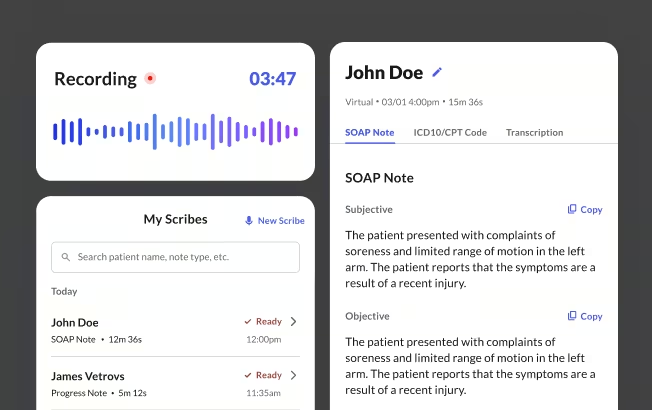
An EHR integration is a link between two software systems. It lets them share data without staff re-entering it. Outpatient practices usually connect their EHR to billing, lab, online scheduling and AI documentation tools. Browser-based tools with a copy-paste workflow can run on day one without IT setup. Native API integrations require a vendor review that can take weeks to months. The right choice weighs staff time saved against setup and maintenance cost.
What You Need to Know About EHR Integrations
- EHR integration links two software systems so data moves between them without staff re-entering it, covering billing, labs, scheduling, and clinical notes.
- Browser-based tools that work with any web-accessible EHR can be running on day one with no vendor queue and no IT setup required.
- Native API integrations require a vendor review process that can take weeks to months; a copy-paste or one-step workflow can address many documentation pain points without that overhead.
Clinicians in independent and group practices spend hours each week re-entering the same data. A patient books online. The front desk re-types their name and insurance into the EHR. A lab result posts. Someone routes it to the right inbox by hand. A visit ends. The note sits outside the chart until someone pastes it in.
EHR integration connects those systems so data moves on its own. The potential benefits include less re-keying, fewer errors, faster billing, and more time with patients. The challenge is deciding which links are worth the effort and which add cost without a real return.
This guide covers how EHR integrations work, what types matter most for outpatient practices, and when a native integration is worth pursuing.
What Is an EHR Integration?
An EHR integration is a link between two software systems that lets them share data without a person in the middle. The scheduling tool writes patient details directly to the EHR or EMR. The documentation tool pushes the finished note into the right chart field. Neither task requires staff to move the data by hand. The system type shapes what can connect, since the differences between EMR and EHR center on interoperability and whether records leave the practice without manual export.
Common examples in outpatient practices:
- EHR to billing platform: diagnosis and procedure codes flow to your RCM or billing service after a visit is signed.
- Lab system to EHR: results post directly into the patient chart inbox and trigger a task.
- Online scheduling to EHR: appointment details and patient demographics write back into the chart before the visit begins.
- AI medical scribe to EHR: a draft note moves from the documentation tool into the correct chart section for the clinician to review and sign.
How EHR Integrations Work
Most modern ambulatory EHRs expose application programming interfaces, or APIs. An API is a set of access points that lets an approved app request data from the EHR or write data back. The EHR controls which apps get in, what they can read, and what they can write.
Two standards handle most data exchange in outpatient settings.
HL7 v2
HL7 version 2 is an older messaging standard still used by labs, imaging systems, and legacy EHRs. It sends event messages: an order is placed, a result is posted. Practices on modern cloud EHRs run into HL7 v2 mainly at the edges, where an older lab or imaging system feeds into the chart.6
FHIR
Fast Healthcare Interoperability Resources (FHIR) is the current standard for EHR APIs. It defines a shared set of data objects: Patient, Encounter, Observation, DocumentReference. Most ambulatory EHRs built in the last decade support FHIR APIs. This includes athenahealth, Elation Health, and AdvancedMD.1,2,5 SMART on FHIR is a security layer that lets apps launch inside the EHR and log in through a standard process. Most marketplace integrations use it.6,7
What data actually moves
The most common data types moving between systems in an outpatient practice fall into four categories.
- Patient and visit data: name, date of birth, insurance, appointment type and time. Used by scheduling tools, intake forms, and reminder systems.
- Clinical data: medications, problems, allergies, vitals, lab results. Used by decision support tools and AI scribes to pull visit context.
- Documentation: progress notes and structured fields. The most common use case for AI scribes: a draft note pushed back into the EHR as a DocumentReference or directly into a note field for signing.
- Billing and admin data: CPT and ICD-10 codes, charge records, claim status. Used by billing platforms and RCM services.
Pull vs. push
Data can move in two directions between systems, and most EHR integrations use both.
Pull means an application asks the EHR for data when something happens. An AI scribe pulls current medications and allergies from the EHR when the clinician starts a new visit. For a comparison of leading AI medical scribes, read our guide on them.
Push means an application sends data to the EHR after something is completed. The scribe pushes the finished note into the chart once the clinician has reviewed it.
Most integrations use both. The scheduling app pulls the day's appointments each morning and pushes updated demographics back after a patient completes intake.
Common Types of EHR Integrations in Outpatient Practices
Four categories come up most often in outpatient practices. Each targets a different part of the administrative and clinical workflow.
Scheduling and intake
Online scheduling and digital intake tools connect to the EHR so a new patient's name, insurance, and appointment type land in the chart before the visit begins. Front desk staff review and confirm rather than re-enter from scratch. A 2020 study of ~100 million patient encounters found physicians spend an average of 16 minutes per encounter in the EHR, with documentation accounting for nearly a quarter of that time.1,2,3,9
Billing and revenue cycle management
Billing integrations let a practice's billing service or RCM platform pull encounter data from the EHR and push back payment status, denial codes, and remittance information. Manual export and re-import can delay billing cycles and introduce transcription errors. For practices using a third-party billing service, a clean data connection reduces the manual handoff between clinical and billing systems.1,3,5,8
Patient communication
Appointment reminders, recall campaigns, and post-visit instructions depend on current scheduling and contact data in the EHR. Tools that pull this data on a schedule can run outreach without requiring staff to export and upload lists manually.
Documentation and AI tools
AI medical scribes are a rapidly growing category of EHR integration for outpatient practices. These tools capture a visit in ambient audio, generate a clinical note, and move that note into the chart. Some use a browser-based copy-paste workflow that works with any web-accessible EHR. Others use a direct API link to write the note into a specific chart section for signing. Both approaches work. The difference is click count.
Benefits and Trade-offs
EHR integration can reduce manual work and improve data accuracy, but it also introduces dependencies and ongoing maintenance. Both sides deserve attention before committing to a new vendor connection.
Benefits
Well-implemented EHR integrations can reduce friction across the administrative and clinical day.
- Reduced double entry. Staff enter data once. Fewer errors, less time spent correcting them through EHR integrations.
- Faster billing. Codes and charges move from the encounter to the billing platform without manual export. Claim submission can happen sooner and denial rates from data errors may fall.
- Better care coordination. Labs, results, and referral information can flow into the chart automatically. Clinicians may see more complete data at the point of care.
- Reduced app switching. Documentation tools that push notes directly into the chart can reduce the need to switch between applications during or after the encounter.
Trade-offs
The same connections that automate data movement also introduce points of failure and vendor dependency.
- Setup time and vendor queues. Native integrations with major EHRs often require a vendor queue, contract review by the EHR company, and a testing period. This can take weeks to months.
- Maintenance. EHR updates can break API connections. The practice waits on either the EHR vendor or the third-party app to push a fix. Support handoffs between vendors are a common source of delays.
- Cost. Integration-enabled features often sit on higher pricing tiers. Calculate the cost against staff time saved before committing.
- Vendor lock-in. Deep integrations make it harder to switch EHRs later, particularly if workflows and templates are built around a specific connection.
Limits and Challenges of EHR Integrations
EHR integrations work well when set up correctly and maintained. Four structural constraints affect independent and group practices more acutely than large health systems with dedicated IT teams.
Vendor queues. EHR companies control their own API marketplaces. A third-party vendor must pass the EHR's review process before connecting. Practices on smaller or mid-tier EHRs may wait weeks for a change to an existing integration, even when the change looks minor.8
API limits. Not all EHRs expose the same data through their APIs. Some block third-party apps from writing notes into the chart. Some allow read access for clinical data but no write-back for documentation. Verify what a vendor's integration can and cannot do with your specific EHR before signing a contract.8
Upgrade breakage. EHR platform updates can change API behavior. An integration that worked yesterday may break after an EHR upgrade. Without IT staff, the first sign is often a staff member noticing that data stopped flowing.8
No in-house IT. Independent and group practices typically operate without a dedicated IT department. When something breaks, the practice manager handles troubleshooting. That usually means calling both the EHR support line and the third-party vendor's line and waiting for one to claim ownership.
Do You Actually Need a Native Integration?
Native integrations are not always necessary, particularly for documentation tools. Work through this checklist before pursuing one.
- How many hours per week does staff spend re-entering data? As an example: if the manual work adds up to less than a few hours a week, the ROI on a complex integration may not justify the setup time.
- Does your EHR have an app marketplace? athenahealth Marketplace includes 500+ vetted integrations.10 Check there first.
- Is the friction in data entry or in note quality? Many practices pursue EHR integrations when the real bottleneck is documentation time. A faster note workflow, even one that uses copy-paste, may solve the problem without a native connection.
- What does the current gap actually cost? Calculate staff time at hourly rates. For example: if the manual gap costs roughly $300 a month in staff time and the integration costs $400 a month, the math does not support it.
- Is there any IT support available? Favor integrations that are self-serve or come with dedicated onboarding support over ones that require configuring OAuth keys or managing API credentials.
Browser-based tools with a copy-paste workflow can address many documentation pain points without a certified EHR integration. Deeper links tend to become worthwhile when visit volume and billing complexity increase to the point where manual handoffs create measurable staff cost or revenue risk.
Where AI Scribes Fit Into Your EHR Ecosystem
AI medical scribes generate structured clinical notes from ambient visit audio through EHR integrations. How the finished note gets into the EHR determines how much manual work remains after the visit. Three connection patterns cover most of what is available on the market.
Browser-based with copy-paste. The scribe runs in a browser tab. After the visit, the clinician reviews the note and pastes it into the EHR. Works with any web-accessible EHR. No IT setup required. But this is not an EHR integration.
One-step note transfer. A single click moves the note into a specific chart section. The clinician still opens the EHR to confirm placement, but the steps are fewer. Whether this uses an API or a browser layer varies by vendor.
Direct API write-back. The EHR's API pushes notes directly into the chart, ready for signing. This requires a certified vendor relationship with the EHR and is part of an enterprise contract. For practices on Epic or athenahealth, this is the most direct path from note generation to chart without manual steps. For practices on smaller EHRs, it may not be available.
Whether you are on Elation Health, Practice Fusion, athenahealth, AdvancedMD, or another ambulatory EHR, the pattern is the same. The note is generated outside the core chart, then brought in for signing. The question is how many steps that handoff takes.
How Commure Scribe Works With Your EHR
Commure Scribe is an AI medical scribe with 60+ EHR integrations. The integration model has two layers, and understanding both matters for practices evaluating the handoff.
Copy-paste on all tiers. Commure Scribe runs alongside any web-based EHR. The clinician Captures the visit, reviews the note, and pastes it into the chart. This works with 60+ EHRs including Athenahealth, Elation, Practice Fusion, eClinicalWorks, AdvancedMD, and SimplePractice. No IT setup. No vendor queue.
Write-back integration. Commure Scribe uses native write-back and DOM integration to deliver notes directly into the correct EHR fields. It identifies the specific Document Object Model elements for the destination, whether that is a Subjective, Objective, Assessment, Plan (SOAP) note field or a progress note section, and inserts the finished text precisely where the chart expects it. The clinician does not switch windows or paste. The note is ready to review and sign without leaving the EHR workflow.
Both paths cover 60+ EHRs. The copy-paste path works on day one with no configuration. The write-back path is available for practices that want the note to move without manual steps.
Commure Scribe captures across 90 languages with automatic detection. Clinicians report that staying present in the room during the visit, rather than managing a keyboard, changes what the note captures. Providers say the AI caught things they would have missed.
Commure Scribe is HIPAA-compliant and System and Organization Controls 2 (SOC 2) certified. Audio is stored and encrypted, and retained per HIPAA requirements. It is not used for AI training. The 7-day free trial requires no credit card.
Frequently Asked Questions
EHR integration is the connection between an EHR system and another software application that lets them exchange data automatically. It eliminates manual re-entry of information that already exists in one system.
Independent and group practices without IT staff carry the full cost of manual data entry directly. Every minute spent re-typing demographics or copying notes between systems is time the practice pays for without a clinical return. Integration moves that work to software.
Browser-based tools with copy-paste workflows can be running the same day, with no IT involvement. Marketplace integrations through an EHR app directory typically take days to a few weeks to configure. Native API integrations that need vendor certification and EHR contract review can take several weeks to months.
Codes and charges that flow from the EHR to a billing platform can support faster claim submission and fewer medical transcription errors. Practices using a third-party billing service get current encounter data without manual file drops. That may shorten the revenue cycle and reduce denials from data entry errors.
An AI scribe can work without a native EHR integration. Browser-based tools let you copy and paste the finished note into the chart. That is often enough when documentation time, rather than data entry, is the bottleneck. A deeper integration pays off once visit volume and billing complexity make manual handoffs costly.
Sources
1 athenahealth. FHIR R4 APIs Implementation Guide. https://docs.mydata.athenahealth.com/fhir-r4/index.html
2 Elation Health. EHR API Integration. https://www.elationhealth.com/resources/primary-care-innovation-and-care-groups-blog-elation-health-ehr/api-integration
3 Tebra. What are EHR APIs and why do they matter for practices? https://www.tebra.com/theintake/ehr-emr/ehr-apis-and-why-they-matter-for-practices
4 eClinicalWorks. Interoperability and EHR Integration. https://www.eclinicalworks.com/products-services/interoperability/
5 AdvancedMD. Developer Solutions. https://www.advancedmd.com/group-practice/developer-solutions/
6 HL7 International. FHIR Overview. https://www.hl7.org/fhir/overview.html
7 ONC (Office of the National Coordinator for Health IT). FHIR Fact Sheet. https://www.healthit.gov/topic/standards-technology/standards/fhir-fact-sheets
8 PMC. A national survey of digital health company experiences with EHR integration. https://pmc.ncbi.nlm.nih.gov/articles/PMC10990546/
9 Overhage JM, McCallie D Jr. Physician time spent using the electronic health record during outpatient encounters: a descriptive study. Annals of Internal Medicine. 2020;172(3):169-174. https://pubmed.ncbi.nlm.nih.gov/31931523/
10 athenahealth. What Is athenahealth Marketplace? 2025. https://www.athenahealth.com/resources/blog/what-is-athenahealth-marketplace
.jpeg)

.jpeg)
.jpeg)

.jpeg)