



Patient Intake Forms: Free Printable Template
A ready-to-use new-patient intake form, a plain-English walkthrough of every section, and the short list of things to double-check before printing.
Written by the Commure Scribe Team
Published: May 15, 2026
•
8 min read
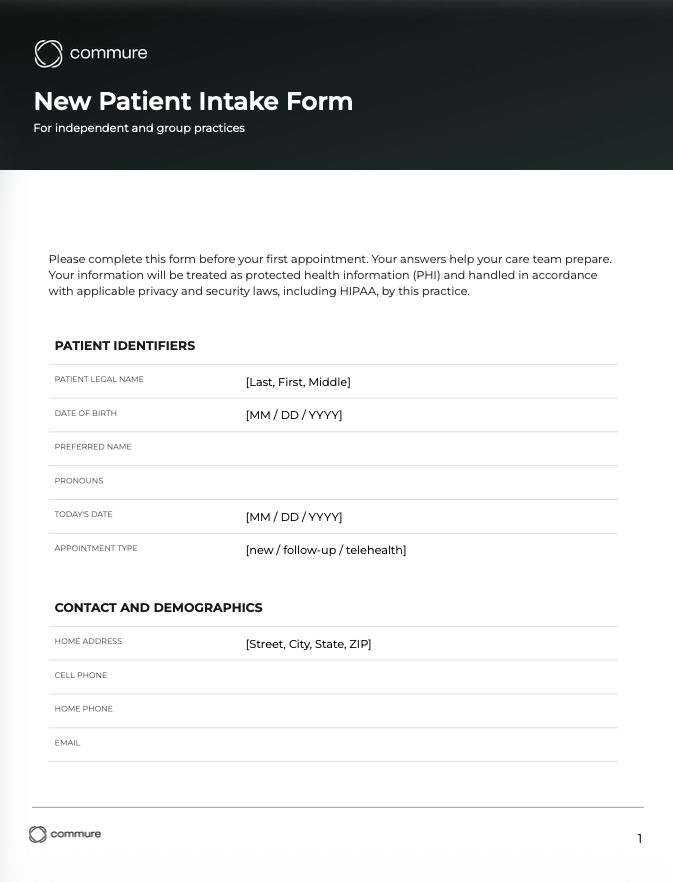
A patient intake form collects what the front desk, the clinician and the audit file need from a new patient. This four-page template opens with a header block for legal and preferred name. Six sections follow, starting with contact and ID, insurance and billing, and reason for visit. The next two cover medical and social history, then drugs and allergies with reaction type. Consents with signatures close the form. Front-desk staff use it at registration, and clinicians use it before the first visit.
What You Need to Know About Patient Intake Forms
- Patient intake forms in this template cover six field groups: contact and ID, insurance and billing, health history, drugs and allergies, consents and sign-offs, and access needs.
- Consents cover the consent-to-treat line, the HIPAA privacy-notice sign-off, a financial policy, and optional telehealth and chaperone checkboxes.
Swap the [Practice Name] header, add or drop specialty sections, and run the consent language past whoever owns compliance at your practice before you print.

What's on the patient intake form template?
The six sections are ordered so the front desk, the clinician, and the audit file each find what they need without flipping pages. Published patient intake forms from Cleveland Clinic,³ Washington University,⁵ and Stony Brook Medicine⁴ cover the same ground, though layouts differ. Here is what each section does and why it matters.
Header block. Patient legal name, date of birth, preferred name and pronouns, and today's appointment type. This is the identifier block that every downstream lookup keys off. If the legal name on the intake form does not match the insurance card, the claim goes sideways. Preferred name and pronouns belong on this block too, not in a separate "extras" section. Anyone who picks up the chart should see them first.
Section 1. Contact and ID. Home address, phone, email, best contact method, preferred language, pharmacy details, and an emergency contact. This is the section the front desk and the patient-portal setup pull from. Best contact method matters more than most practices realize: a patient who wants text and gets voicemail misses appointment reminders. Language is here, not buried in an access-needs afterthought, because the interpreter call has to happen before check-in, not after.
Section 2. Insurance and billing. Primary plan, member ID, group number, subscriber, secondary insurance if applicable, responsible party, and a signed financial policy line. The ACP and American Medical Association (AMA) sample forms keep this block in the same position¹ ². The signed financial policy is the line that gets overlooked; without it, the patient's downstream balance can turn into a dispute. Ask for both sides of the insurance card as a scan. The eligibility line is almost always on the back.
Section 3. Reason for visit and symptoms. The patient's main concern in their own words, onset and duration, and what they have already tried. This is the raw material for your assessment and saves you from re-asking the basics in the room. Leave room for the patient to write more than a single word. A two-line box gives you a chief complaint you can actually work from; a one-line box gives you "pain."
Section 4. Medical, surgical, family, and social history. Active and past conditions, surgeries, family history, tobacco and alcohol use, occupation, and exercise. Cleveland Clinic's health history packet uses the same scope³. Social history is worth its own block rather than a checkbox at the bottom. Occupation drives half the differential for musculoskeletal complaints and a quarter of the preventive conversation; do not bury it. When Section 4 needs more depth, pair the packet with a medical history form template organized into nine clinical sections with HIPAA-aligned fields.
Section 5. Drugs and allergies. Current meds with dose, OTC and supplement use, drug allergies with reaction type, and non-drug allergies. You reconcile this at the visit rather than building it from scratch. The reaction-type column is the one that matters. "Penicillin allergy" with no reaction listed is how anaphylaxis history and childhood rash get treated the same, and neither of them should be. After you reconcile current medications at the visit, record them in a medication log template so later dose changes and stopped drugs build on one running record.
Section 6. Consents and sign-offs. General consent to treat, HIPAA privacy-notice acknowledgment, financial policy, and checkbox specialty consents for telehealth and chaperoned exams. Patient and staff signatures close the packet. Most patient intake forms put this section on its own page so the consent text and the signature line stay together. Keep the signature line on the same page as the consent text. The consent-to-treat block is general consent for the visit, not procedure-specific informed consent. Surgery, blood products, and other higher-risk procedures still need their own consent forms. Chaperone is set up as patient opt-in here, but some state rules and practice policies require a chaperone to be offered or present regardless. Consents signed on a separate page, with no date, are the first thing a records reviewer flags.
An "access needs" prompt for language, interpreter, and accommodations sits inside Section 1. The front desk can act on it at check-in, not at the exam-room door.
How do I customize the patient intake form template?
Patient intake forms are practice-specific. The Word file is the starting point. Four customization passes cover most use cases.
Branding. Most patient intake forms carry practice branding up top; this template leaves a [Practice Name] placeholder for you to replace, with space for a logo. Update the footer if your practice uses a document-control line or version number. Leave the consent language alone during the branding pass. Rewriting consent text to match your brand voice is how small practices end up with consent blocks that read cleanly but fail a records request later.
Specialty sections. Patient intake forms vary most in the middle. An OB/GYN form often adds menstrual, obstetric, and gynecologic history⁵. A pain clinic adds a pain diagram and function check⁴. An integrative medicine form expands food, sleep, and lifestyle sections⁶. Pediatric forms add growth history, immunizations, and school or daycare attendance. Mental health forms add a brief safety-screening block. The six-section frame stays. The middle grows.
Consents. Have whoever owns compliance at your practice look at the HIPAA sign-off, telehealth consent, and voicemail line before you print. The defaults are on the conservative side. The HIPAA line includes the patient's right to decline to sign and the practice's duty to document the good-faith effort. The voicemail line scopes messages to scheduling, billing, and test-result availability, not detailed clinical content. The telehealth checkbox defers to state law and your practice policy, which is a placeholder. Many states require specific telehealth disclosures (provider identity and location, technology used, alternatives, privacy and security risks), so most practices use a longer separate telehealth consent and reference it here. Whoever owns compliance can run this consent review alongside a HIPAA compliance checklist covering risk analysis, safeguards, and Office for Civil Rights audit prep.
Cadence. Pull your patient intake forms once a year and walk through them. Do an extra pass when consent language changes, a privacy notice gets updated, a new specialty joins the practice, or a payer starts asking for something you are not capturing. The ACP and AMA publish sample forms worth cross-checking against¹ ². For first-visit packets, compare your layout with a new patient forms guide that covers what to include and how to design each form.
Common mistakes to avoid
A template solves the structure problem, not the practice-operations problem. The intake forms that fail during a records review usually fail the same way, regardless of how good the underlying patient intake forms are.
Signature separated from consent text. When patients sign on a page by itself, you lose the tie between what they agreed to and what they signed. Keep the consent text and the signature on the same page.
Health data asked twice. If your intake form asks about medications on page 2 and the rooming nurse asks again on the EHR template, the patient tells two different stories. You then have to reconcile both. Pick one place to ask.
No reaction type on allergies. A drug name with no reaction listed is not a useful allergy. Leave space for a short phrase: rash, GI upset, throat swelling. That is the difference between a precaution and a hard stop.
Missing date next to the signature. A signed consent with no date is a signed consent without an anchor. Put the date field right next to the signature line, not at the top of the page where the patient already filled it in.
Forgetting the "preferred language" field. If a patient needs an interpreter, the front desk has to know before the visit. Keep the language line in Section 1, not tucked into access needs.
When should a practice consider digital or AI-enabled intake?
Printable patient intake forms work for any practice. The trigger points for going digital are specific. The front desk is spending real time retyping paper into the EHR. Returning patients are filling out the same packet from scratch every visit. New-patient no-shows are climbing because the packet is too long to finish.
Digital intake lives on a phone or tablet the patient fills in before the visit. Answers can flow into the EHR, which saves your front desk from re-typing. The step after that pairs digital intake with an ambient AI scribe that drafts the structured mote from the visit conversation. The intake form hands the scribe the history, meds, and allergies already filled in. You focus on the plan in the room, not on re-asking what the patient already wrote. For a ranked breakdown by practice size and specialty, see the best AI medical scribes guide.
How Commure Scribe fits with the intake form
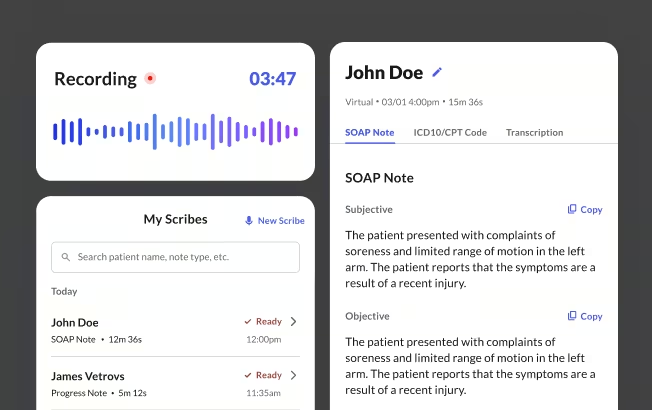
Commure Scribe is an ambient AI scribe that 75,000+ clinicians use in the room. If you have the intake piece covered with these patient intake forms, Scribe picks up where the form stops. Your patient fills the intake form before the visit. You walk in, talk, and click End Recording. A draft note is ready in seconds at 99.4% transcription accuracy. You review, edit, and finalize it. Nothing posts to the chart until you say so.
Suggested ICD-10 and CPT codes show up for you to pick. The coding still lives with you, not the software. The consents the patient signed on the intake form stay in the chart as the paper trail your records request or audit will ask for.
This is a template and a plain-English explainer, not legal or compliance advice. Run these intake forms past your Privacy Officer, compliance lead, or healthcare counsel for the specifics of your state, specialty, and payer mix before you adopt or edit them.
Patient Intake Form Template Download
Download a copy of this template
Thanks! Your patient intake form template download is ready.
Click below to download
Frequently Asked Questions
Registration is the front-desk step: who is the patient, what is the insurance. Intake is wider. It adds the health history, meds, allergies, and consents you care about in the room. Most practices roll both steps into one packet and call them patient intake forms. The intake forms in this template follow that combined pattern.
Yes. Your practice has to give patients the Notice of Privacy Practices, and most bundle the acknowledgment into the intake packet. You do not have to print the full notice on the form itself. Treat the completed intake form as PHI: store, send, and dispose of it the way you would the rest of the chart, under HIPAA's privacy and security rules.
The legal guardian signs the consents. Patient intake forms for minors should still capture the child's preferred name, pronouns, and emergency contact. For adolescents, leave a line for the patient to add health history in their own words, separately from the guardian's entries. Some visit types have extra confidentiality rules: many states let minors consent on their own to STI testing, contraception, mental health, or substance use care, and substance use disorder records get extra protection under 42 CFR Part 2. Check with your compliance lead before you adopt minor-specific consent language.
Retention of patient intake forms is governed by state medical-records law, not HIPAA, and the rules vary widely. State minimums for adult records typically run from five to ten years. Minors usually require retention past the age of majority for an added number of years. HIPAA itself sets a separate six-year retention floor for compliance documents like the signed NPP acknowledgment, authorizations, and accountings of disclosure. Completed intake forms generally follow the same retention rule as the rest of the chart. Check the specifics with whoever owns compliance at your practice and your healthcare counsel.
You can still treat them. The rule is that your practice makes a good-faith effort to get the acknowledgment and documents the effort when it is declined. On your patient intake forms, keep a short line at the bottom of the consent page where staff can note the refusal and the date. That record is what an auditor is looking for.
Yes, and it is increasingly common. Many digital intake tools shorten the form for return patients and drop answers into the EHR. You can keep the same six sections online that paper intake forms use.
Sources
- American College of Physicians. (2025). Patient care & office forms. https://www.acponline.org/practice-career/business-resources/office-management/patient-care-office-forms
- American Medical Association. (2025). Private practice playbook: Sample forms. https://www.ama-assn.org/practice-management/ama-steps-forward-program/private-practice-playbook-sample-forms
- Cleveland Clinic. Medical history intake form. https://my.clevelandclinic.org/-/scassets/files/org/wellness/forms/medical-history-intake-form.pdf
- Stony Brook Medicine Center for Pain Management. New patient intake form. https://www.stonybrookmedicine.edu/sites/default/files/new-patient-intake.pdf
- Washington University in St. Louis, Department of Obstetrics & Gynecology. (2020). Obstetrics & gynecology intake form. https://obgyn.wustl.edu/app/uploads/2020/04/OBGYN_IntakeForm2.19_fillable.pdf
- Andrew Weil Center for Integrative Medicine, University of Arizona. (2014). Patient intake form. https://awcim.arizona.edu/file/27702/Patient+Intake+1.6.14.pdf