



Best Patient Documentation Software for Independent and Group Practices in 2026
A side-by-side comparison of five AI documentation tools for independent and group practices, with published pricing, EHR handoff by plan, coding support, free tier terms, and a trial protocol to test fit before you buy.
Written by the Commure Scribe Team
Published: April 24, 2026
•
13 min read
Updated September 19, 2026
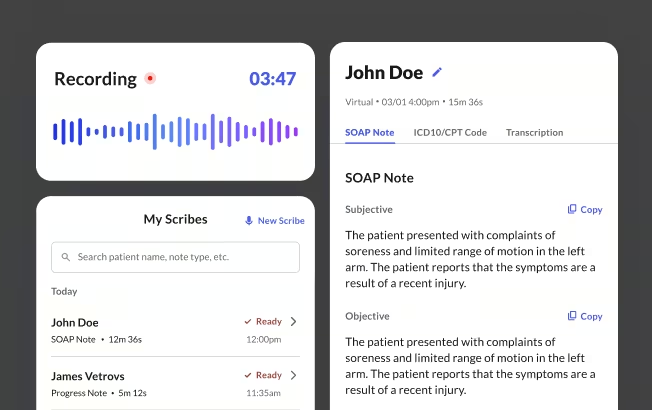
What You Need to Know About Patient Documentation Software
This guide covers ambient AI scribes for practices of 1 to 100 clinicians. Clinicians who would rather narrate notes themselves should see the best medical dictation software guide.
Clinicians in a 2026 multisite study documented 16.0 fewer minutes per 8 scheduled patient hours after adopting an AI scribe¹.
Shortlist two tools from the comparison below, then run both on the same clinic days before you commit.
How Do the 5 Best Patient Documentation Tools Compare?
The five leading patient documentation tools in 2026 are Commure Scribe, Heidi Health, Freed AI, Nabla and Tali. The table compares them on the four factors independent and group practices weigh most.
This is the category also known as the AI medical scribe. Pricing, trial terms and integrations change often, and every figure below was verified at vendor sources on August 12, 2026. Confirm details on each vendor site.
One pattern stands out in this patient documentation software comparison: EHR handoff is the real price variable. Every tool here drafts a note, and they differ in how many times the clinician copies text across by hand. The tools that push a note directly into the chart put that capability on a higher tier or behind a sales conversation, while copy and paste is available at every price.
A second pattern is worth noting before you shortlist. Heidi, Nabla and Tali all run ongoing free tiers rather than countdown trials, which makes running two tools in parallel for a month practical.
What Are the 5 Best Patient Documentation Software Tools?
The best patient documentation software depends on EHR, budget and whether coding matters at the entry price, so each profile below maps those three. Each also covers trade-offs for an independent or group buyer.
Pricing notes reflect each vendor's published model, not a verified quote. Treat them as starting points for your own demo questions.
1. Commure Scribe
Commure Scribe is the pick for practices that want published pricing and suggested codes at the entry tier. It records the visit conversation and generates a structured note the clinician reads, revises and signs. Solo and small practices of 1 to 5 providers pay $89/mo, or $59/mo billed annually, after a 7-day unlimited trial that needs no credit card¹¹. Larger group practices arrange pricing, direct EHR integration and live onboarding through group sales. Commure reports 75,000+ clinicians, 25M+ patient encounters annually, 99.4% transcription accuracy, a 43-second average chart close, 90 languages with automatic detection, and 60+ EHR integrations. See Commure Scribe features for the full capability list.
Key features: Suggested ICD-10 and CPT codes at every plan, including the entry price, and a specialty template library with a custom template builder. Also live translation and transcription, citations that link each part of the note to the encounter transcript with audio playback, and custom formatting rules that adapt as the clinician edits.
Best for: Independent and group practices that want a published price and coding at the entry tier. The 7-day trial runs without a sales call.
Trade-offs: Direct EHR integration is arranged through group sales, so a practice of one to three clinicians copies and pastes. The transcript is not speaker-labeled, so a reviewer checking a disputed line can find the source text without confirming from the transcript who said it. Citations, audio playback and custom formatting are company-confirmed rather than documented on the public product pages.
2. Heidi Health
Heidi Health is the strongest free patient documentation software in this comparison, with a permanent free tier that includes unlimited AI documentation and no time expiry. Heidi publishes its US prices in full: Free is $0, Clinician is $150/mo or $110/mo billed yearly, and Practice is $180 per user per month billed annually, with a 14-day trial on both paid tiers⁷. It offers two integration modes, Embed for live documentation inside the record and Connect for syncing finished notes to the EMR, with named coverage of Epic across Hyperspace, Hyperdrive and Haiku, plus athenahealth, Accuro, WRS Health and Blueprint Solutions⁷. Heidi is an Australian company expanding into the US.
Key features: A permanent free tier with unlimited AI documentation, and published per-user pricing at every tier. Also Embed and Connect integration modes, advanced templates on paid tiers, and template syntax that omits a section when the content is absent.
Best for: Practices that want to run a tool at no cost before committing. Epic practices get named coverage across three Epic surfaces.
Trade-offs: ICD-10 and CPT coding sits on the higher tiers, and EHR integration is an add-on on the free tier. The company is newer to the US market than several competitors here.
3. Freed AI
Freed AI documents its coding workflow in more detail than any other tool in this comparison. Its help center describes an editable billing codes tab, a dropdown of alternative recommendations per code, and manual code search, and states plainly that the feature is informational only and does not submit codes to payers or billing systems⁶. Pricing runs $39/mo Starter, $79/mo Core, and $119/mo Premier or $104/mo billed annually, with a 7-day trial that needs no credit card⁶. Residents, students and trainees get Core at no cost.
Key features: An editable billing codes tab with alternative recommendations per code and manual code search. Also specialty templates, a template builder, and Chrome Extension push to the chart on Premier.
Best for: Solo clinicians and small practices comparing on entry price. It carries the lowest paid tier in this set.
Trade-offs: EHR push, automatic ICD-10 and the Coding Assistant all sit on Premier or Group, so the $39 and $79 tiers carry no coding and no push. Group pricing is quote-based, and the Chrome Extension is a push rather than a bidirectional integration.
4. Nabla
Nabla is the one tool here tested in a published randomized controlled trial, among the first in the field. Across 238 outpatient physicians in 14 specialties, Nabla cut time-in-note by 9.5% versus control (95% CI −17.2% to −1.8%; P=0.02), while Microsoft DAX Copilot, the other product tested, showed no significant change (−1.7%; P=0.66)⁴. Nabla names six EHRs on its site, Epic, athenahealth, Oracle Health, NextGen, Arya EHR and Greenway Health, integrated through Nabla Connect or an API-first route⁸. Nabla states that data retention policies are fully configurable and publishes no default retention period, and it offers a free and paid tier structure without publishing prices.
Key features: Six named EHR integrations including Epic and Oracle Health, through Nabla Connect or an application programming interface (API) route. Also a free tier with volume limits and no time expiry, configurable data retention, and a published compliance stack of HIPAA, System and Organization Controls 2 (SOC 2) Type 2, ISO 27001 and GDPR.
Best for: Practices that weight independent evidence over feature breadth. Epic and Oracle Health sites have a named integration path.
Trade-offs: Nabla publishes no pricing page in any locale, so a practice cannot establish cost without a call. ICD-10 and CPT coding is described as in development rather than shipping.
5. Tali
Tali pairs an ongoing free tier with the most explicit code review workflow in this set. Recommended ICD-9, ICD-10 and ICD-11 codes surface a few seconds after the note appears, and the clinician checks eligibility details, adds or adjusts codes manually, and confirms before submitting a claim, with Tali stating that recommended codes are there to review and confirm rather than to submit automatically¹⁰. On its US pricing page, Starter reads US$68 per month or US$60 per month billed annually, while the Pro card on the same page is listed at CA$100 per month, so confirm the Pro currency with Tali before comparing⁹. Tali reports a top 1% ranking in US Department of Veterans Affairs speech-recognition testing from the VA 2024 AI Tech Sprint, a result not published at source.
Key features: An ongoing free tier with volume caps, and a code review workflow with an explicit confirm step before a claim is submitted. Also admin form generation, a medical dictation mode, and access through a Chrome Extension and desktop app.
Best for: Practices that want a documented coding review step on a free or low-cost plan. Cross-border practices get eight named Canadian systems including OSCAR Pro and PS Suite.
Trade-offs: CPT codes are not documented, and Tali does not state which plans include the billing code recommender. A business associate agreement is not confirmed on Tali's public pages, so confirm terms before US patient data reaches the tool.
What Does Patient Documentation Software Actually Do in 2026?
Patient documentation software produces the clinical note, and the EHR stores it and runs orders and billing from it. The software sits on top of the EHR rather than replacing it, so a practice keeps its existing system of record. For what the note itself has to contain, see the clinical documentation requirements.
The term covers more than one purchase. Dictation software turns spoken words into text in a chart field and still requires the clinician to dictate every sentence. Clinical documentation integrity software reviews finished notes for specificity and coding support, and is usually bought at hospital scale. Patient intake software handles forms and portal paperwork the patient fills in. The five tools in this guide are ambient AI scribes, which record the visit conversation and draft a structured note.
The workflow has three steps. A structured note, often in SOAP format, appears within seconds of the visit ending. The clinician then reads the draft, edits it, and decides what goes into the record, which is the step that carries the weight in this category: peer-reviewed analysis of ambient scribes reports low overall error rates, with failure modes shifting toward fabrications and critical omissions rather than simple transcription mistakes⁵. The finished note then moves into the system of record by copy-paste, browser extension, or direct integration. See EHR integrations for how Fast Healthcare Interoperability Resources (FHIR), HL7 and write-back differ.
That last step is where products differ most, and it drives much of the pricing above.
Why Does the Documentation Layer Matter More Than the EHR?
Your EHR decides where notes live, and your documentation software decides how fast they get written. Most practices treat the two as one decision, then find that charts still pile up after an EHR switch.
The note-production layer is where the hours go. A time-and-motion study in Annals of Internal Medicine put it at two hours of EHR and desk work per hour of direct clinical face time². Swapping the system of record rarely changes that ratio, and swapping the tool that drafts the note can.
The category has also matured enough to compare on evidence rather than demos. Roughly 30% of physician practices now use some form of AI scribe³. A 2026 multisite JAMA study followed 8,581 clinicians across five US academic health systems, 1,809 of them AI scribe adopters, and tied adoption to 16.0 fewer minutes of documentation time and 13.4 fewer minutes of total EHR time per 8 scheduled patient hours, alongside 0.49 extra weekly visits¹. That study measured time and visit volume rather than note quality, and it named no products, so it is evidence about the category rather than about any tool in this comparison.
The buying question has moved past whether these tools work. It now comes down to fit: your panel, your EHR, your budget.
How Were These 5 Tools Scored?
Any ranking of patient documentation software should show its criteria, so here are the seven used, weighted for a practice choosing a note-production layer. Published quality controls carries 25 because on this keyword the note is the product, and EHR handoff carries 20 because that is where the money goes.
Raw totals are 6.975 for Commure Scribe, 6.950 for Heidi Health and 6.850 for Freed AI. Every gap sits under the 0.2 threshold at which this methodology treats products as tied, so all three place first.
Four rules govern how a cell gets filled. Scores run 0 to 10 in half points, where a 10 requires an objective external top standard such as first place in a recognized independent evaluation or peer-reviewed research on the product itself, and most real products land between 4 and 7. Capability a practice of 1 to 100 clinicians cannot obtain earns nothing, and that rule applies to Commure Scribe on the same terms as everyone else. Where no underlying fact exists, a cell is marked not assessable rather than given a middling number, and a named feature with nothing behind the name caps at 2.0. Vendor-reported figures, including accuracy percentages, are attributed in the profiles above and moved no cell for any product. A companion scorecard of the best AI medical scribes applies a published, weighted method to 10 tools, comparing cost, EHR write-back and quality controls.
No product's output was tested here. Testing five products against a controlled encounter set is the right way to assess note quality, and nobody in this category has published one, including Commure.
Commure publishes this page and sells Commure Scribe. Four of its seven scores, marked † above, rest on capability the company confirms and has not yet documented publicly; documentation is in progress, and every competitor cell traces to that vendor's own site.
What Should Independent and Group Practices Look For?
Four checks separate a tool that works out from one that surprises you in month two. Each is answerable before you sign.
Check which plan does EHR push. This is the most common post-purchase surprise in this category. Freed puts EHR push on Premier, Heidi puts integration on paid tiers, and Commure Scribe arranges direct integration through group sales. The entry price you compared may not include the capability you were comparing on.
Check what "coding" means on the plan you are buying. A tool that names ICD-10 support is not the same as one that documents a review step. Freed and Tali both describe how a clinician reviews, adjusts and confirms codes, and both state that nothing is submitted automatically.
Check whether the free tier expires. Heidi, Nabla and Tali run ongoing free tiers with volume caps rather than countdown trials, which lets a practice run two tools in parallel for a month on its own visits.
Check the business associate agreement (BAA) before patient data touches the tool. Compliance posture varies, and some vendors state compliance without publishing terms. Confirm the BAA in writing, and see HIPAA-compliant AI note-taking for the full checklist.
How Do You Run a Documentation Software Trial?
Test your own workflow rather than the vendor's demo script. Draft quality is easy to admire in a scripted encounter and tells you little about a full clinic day.
Five steps make a trial decisive:
- Pick two tools, not five. Comparing more than two on live visits produces impressions rather than a decision.
- Run both on the same clinic days. Same clinician, same visit types, same week. Comparing a busy Monday on one tool against a light Thursday on another tells you nothing.
- Count edit time. Measure the minutes spent fixing the draft before signing, for each tool, on the same cases.
- Test your hardest visit type first. A complex multi-problem visit, a heavy accent, or a talkative family member in the room. The easy visits will work on every tool.
- Push a note to your EHR before the trial ends, on the plan you would actually buy. This is where trials most often turn out to have tested something you were not going to purchase.
Ask about the BAA in week one. If it takes three weeks to get an answer, the response time is itself information about what support will look like after you sign.
This article is for informational and educational purposes only, does not constitute legal, medical, or professional advice, and does not guarantee the suitability, pricing, or performance of any documentation platform.
Frequently Asked Questions
Documentation software produces the clinical note, and the EHR stores it and runs orders and billing from it. Documentation software sits on top of your EHR rather than replacing it, so you keep the system of record you already have.
Published prices in this comparison run from $0 to $180 per user per month. Heidi runs a permanent free tier, and Nabla and Tali both offer ongoing free tiers with volume caps. Paid entry tiers start at $39/mo with Freed. Nabla publishes no prices. Check which plan includes EHR push before comparing, because the entry price often does not.
It depends on the tool and the plan. Nabla names six EHRs including Epic, athenahealth, Oracle Health and Greenway Health. Heidi offers Embed and Connect modes across Epic, athenahealth and others. Freed pushes through a Chrome Extension on Premier. Commure Scribe arranges direct EHR integration through group sales, so a practice of one to three clinicians copies and pastes. Tali integrates through a Chrome Extension and desktop app.
The clinician remains responsible for the note and the codes. Every tool here produces a draft the clinician reads and signs, and the tools that suggest codes describe a review-and-confirm step rather than automatic submission. Freed states that it does not submit codes to payers or billing systems. Tali states that its recommended codes are there to review and confirm. Confirm your own documentation and coding policies with your compliance team.
You can keep your EHR. Ambient AI scribes run alongside any EHR and deliver drafted notes for the clinician to review and move into the chart. Switching EHRs for charting reasons alone is usually the more expensive path.
Sources
- Rotenstein L, Holmgren AJ, Thombley R, et al. Changes in Clinician Time Expenditure and Visit Quantity With Adoption of Artificial Intelligence-Powered Scribes: A Multisite Study. JAMA, https://jamanetwork.com/journals/jama/article-abstract/2847319, 2026.
- Sinsky C, Colligan L, Li L, et al. Allocation of Physician Time in Ambulatory Practice: A Time and Motion Study in 4 Specialties. Annals of Internal Medicine, https://www.acpjournals.org/doi/10.7326/M16-0961, 2016.
- Columbia University School of Nursing. Health Care's Rush to AI Scribes: Risks Patient Safety, https://www.nursing.columbia.edu/news/health-cares-rush-ai-scribes-risks-patient-safety-researchers-warn, 2025.
- Lukac S, et al. Ambient AI Scribes in Clinical Practice: A Randomized Trial. NEJM AI, https://pmc.ncbi.nlm.nih.gov/articles/PMC12768499/, 2025.
- Topaz M, et al. Beyond Human Ears: Navigating the Uncharted Risks of AI Scribes in Clinical Practice. npj Digital Medicine, https://www.nature.com/articles/s41746-025-01895-6, 2025.
- Freed, Pricing and ICD-10 Codes in Freed, https://www.getfreed.ai/pricing and https://help.getfreed.ai/en/articles/12223267-icd-10-codes-in-freed, 2026.
- Heidi Health, Pricing, Integrations, and Mastering Your Heidi Templates, https://www.heidihealth.com/us/pricing and https://www.heidihealth.com/us/integrations and https://support.heidihealth.com/en/articles/9817523-mastering-your-heidi-templates-an-advanced-guide, 2026.
- Nabla, https://www.nabla.com/, 2026.
- Tali AI, Pricing, https://tali.ai/us/pricing, 2026.
- Tali AI, Billing Code Recommender, https://tali.ai/us/resources/ai-scribe-billing-codes, 2026.
- Commure Scribe, Pricing, https://getscribe.commure.com/pricing-page, 2026.
.jpeg)
.jpeg)
.jpeg)


.jpeg)
.jpeg)
.jpeg)
.jpeg)