



New Patient Forms: Free Template and Guide
A practical guide for solo and group practices covering what to include, how to structure intake forms patients actually complete, and how form design affects documentation quality.
Written by the Commure Scribe Team
Published: May 6, 2026
•
9 min read
Updated May 6, 2026
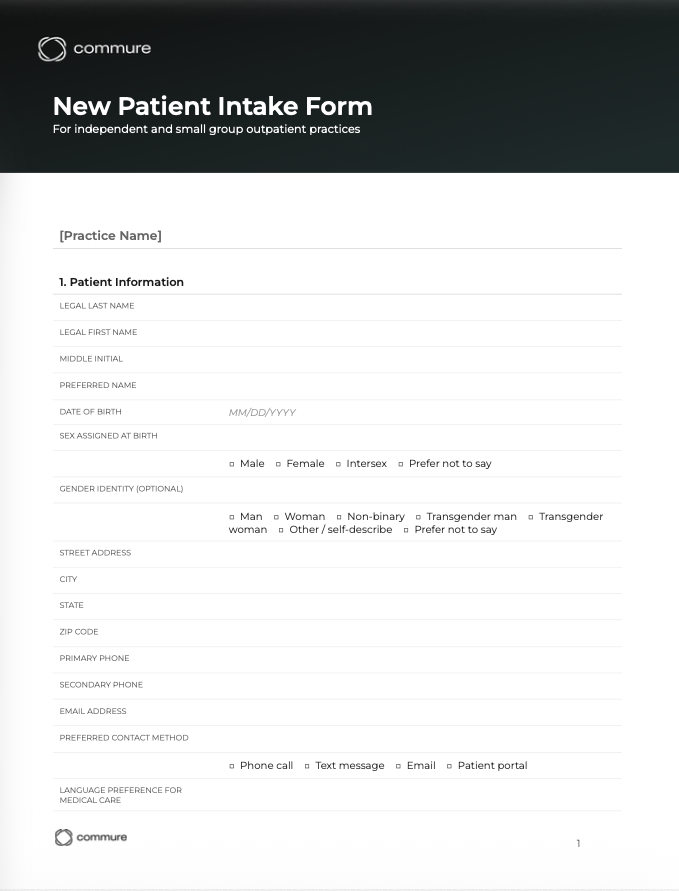
A new patient form is the set of documents a practice collects before or at a patient's first visit. Practices also call it a patient intake or registration form. Its five sections typically cover demographics, insurance and payment, medical history, reason for visit and consents. The history section lists medications and allergies. Typical consents include the HIPAA privacy notice acknowledgment and consent to treat. Front-desk staff use it to register the patient, and clinicians use it to prepare for the visit.
What is a new patient form?
A new patient form, sometimes called a patient intake form or patient registration form, is the set of documents a practice collects before or at a patient's first visit. It captures the information a clinician and their staff need to open a chart, verify coverage, understand the patient's history, and document consent.
The form serves two audiences. Front-desk staff need demographic and insurance data to register the patient and verify eligibility. The clinician needs medical history, current medications, allergies, and the reason for the visit before they walk in the door. A well-designed form meets both needs without asking the patient to fill out the same information twice.
What should a new patient form include?
Most new patient intake packets contain five core sections. Fields within each section vary by specialty, but the structure holds across outpatient practice settings.
- Patient demographics. Full legal name, date of birth, sex, address, phone number, email, and emergency contact. This data feeds directly into the EHR registration record. Errors here create downstream billing problems, so legibility and field validation matter.
- Insurance and payment information. Primary and secondary insurance, member ID, group number, policyholder name and relationship to patient, and a preferred payment method for copays and balances. Digital collection lets patients attach a photo of their insurance card, which saves a staff step.
- Medical history. Current medications (name, dose, frequency), known allergies and reactions, past surgeries and hospitalizations, active diagnoses, and family history relevant to the specialty. Primary care intakes run broader than dermatology or physical therapy intakes. Practices that keep history on a standalone page can start from a medical history form template with nine clinical sections.
- Reason for visit and current symptoms. A brief description of the chief complaint and, optionally, a structured symptom checklist. Most practices underuse this section. A complete reason-for-visit gives the provider a working hypothesis before entering the room and cuts the time spent establishing basic context during the visit.
- Consents and acknowledgments. At minimum: HIPAA notice of privacy practices acknowledgment, consent to treat, financial responsibility agreement, and any practice-specific policies (cancellation, communication preferences, telehealth consent if applicable). Present each as an individual, clearly labeled section with its own signature line. Self-pay patients also require a Good Faith Estimate disclosure under the No Surprises Act.
What fields are actually required?
No federal regulation specifies the exact fields a new patient form must contain. HIPAA requires that patients receive and acknowledge a Notice of Privacy Practices on or before their first visit. Most payers require basic demographic and insurance data for claims processing. State laws vary on consent requirements.
The No Surprises Act (effective January 1, 2022) requires practices to give uninsured and self-pay patients a written Good Faith Estimate of expected charges at scheduling or on request. The requirement applies to all providers and facilities. A GFE disclosure belongs in the financial responsibility section of the intake packet, presented as a separate signed acknowledgment.
Section 1557 of the ACA (final rule updated May 2024) applies to practices that receive federal financial assistance, including Medicare, Medicaid, ACA marketplace payments, or federal grants. These practices must include a Notice of Nondiscrimination and language taglines in the top 15 languages spoken in their state. Both items belong in the intake packet. Verify specific obligations with a healthcare attorney or compliance officer.
The practical standard is that a new patient form should capture everything the practice needs to open a chart, verify coverage, and begin a defensible clinical record. The AMA's Private Practice Playbook includes sample intake documents as a reference baseline.¹ Practices building a full packet can draw on free medical form templates organized by category, from patient intake and consent to billing and behavioral health.
The design question comes down to completeness versus length. Forms that ask for everything produce low completion rates and frustrated patients. Forms that ask only for what the visit will use reduce friction without sacrificing clinical utility.
How does form structure affect visit length and documentation burden?
The form a patient completes before the visit directly affects how much time the provider spends in the room re-establishing information that was already available.
Pre-visit data reduces in-room re-asking. A structured intake captures the chief complaint, current medications, and relevant history. The provider enters the room with context. The visit moves faster to clinical reasoning. Research across ambulatory practices finds that 61% of claim denials trace back to simple demographic or technical errors introduced during manual intake transcription.²
Structured intake improves note quality. Complete intake data gives the provider a direct reference point when drafting or reviewing a note. Incomplete intake creates gaps in the subjective section that the provider fills from memory after the visit. A study published in JAMA Surgery found that electronic forms reduced consent entry error rates from 32% to 1% compared to paper-based forms.³
Form design affects documentation downstream. An intake form that captures the reason for visit in the patient's own words gives the provider a starting point for the history of present illness (HPI). A structured symptom checklist generates data that maps into the review of systems. Design choices made at intake carry forward into the note.
Paper vs. digital new patient forms: what changes?
Most practices have moved away from paper intake, or are in the process of doing so. The differences affect both staff workflow and patient experience.
Paper forms create a transcription step. A staff member enters data from the completed form into the EHR. Transcription introduces errors, takes time, and leaves data unavailable until after the patient arrives. A patient who forgets the form at check-in delays the visit.
Digital forms eliminate transcription. The patient completes the form on their phone or a practice device before arriving. Data flows directly into the record. Staff see completeness before the appointment. The practice can flag or follow up on incomplete forms automatically.
Pre-visit completion changes the flow. The clinical team reviews intake before the visit begins. The provider walks in with the history already read, not encountering it for the first time in the room. For complex patients, this changes preparation time significantly.
HIPAA and data security apply to digital forms. Any platform collecting protected health information must be HIPAA compliant. This includes e-signature platforms, form builders embedded in patient portals, and standalone intake tools. Before selecting a digital form solution, confirm the vendor will sign a Business Associate Agreement (BAA). Before a new intake platform goes live, run through a HIPAA compliance checklist that covers risk analysis and safeguards alongside the BAA.
How do you design a new patient form patients actually complete?
Completion rates drop when forms are long, confusing, or duplicative. Several design decisions consistently improve completion.
Ask only what you will use. Every field on the form needs a clear destination in the chart or billing workflow. Remove fields that exist because "we've always asked that" without a clear use case. Shorter forms produce higher completion rates.⁴
Group related fields together. Patients move through a form more easily when sections follow a logical sequence: personal information, then insurance, then medical history, then consents. Mixing categories increases abandonment.
Use plain language throughout. Clinical abbreviations and insurance jargon slow patients down and generate inaccurate answers. Write field labels and instructions the way a patient understands them, not the way the EHR labels them internally.
Make consents readable. HIPAA acknowledgment language is often dense legal text. Patients sign without reading it. A brief plain-language summary above the formal language improves comprehension and strengthens the defensibility of the consent.
Test on mobile. Most patients open a pre-visit form link on a phone. Forms that require pinch-to-zoom, have small tap targets, or break layout on mobile generate partial completions or front-desk calls.
How does intake connect to AI-assisted documentation?
Most guides on new patient forms skip this connection. The structure of what a practice captures before the visit affects the quality of what the AI produces during and after it.
Intake data gives the AI scribe starting context. A provider who reviews a completed intake form before entering the room carries that context into the visit. The conversation starts further along. The AI scribe captures a visit already focused on clinical reasoning rather than baseline history-taking. The note may reflect greater efficiency but will be lacking historical information and context leading to greater billing issues including denials.
Paper intake and manual documentation create redundancy. The same information ends up in three places: the form, the provider's manual note, and the billing template. The provider re-enters or re-dictates information already collected. Digital intake integrated with the EHR eliminates one or two of those reentry steps. AI-assisted note generation eliminates another.
Structured intake cuts re-asking in the room. A patient who documents their medication list, current symptoms, and reason for visit before the encounter gives the provider what they need. The visit moves directly to examination, assessment, and plan. For practices using ambient documentation tools integrated with an EHR or digital intake tool, the AI captures a clinically richer visit from the first exchange.
How Commure Scribe fits into this workflow
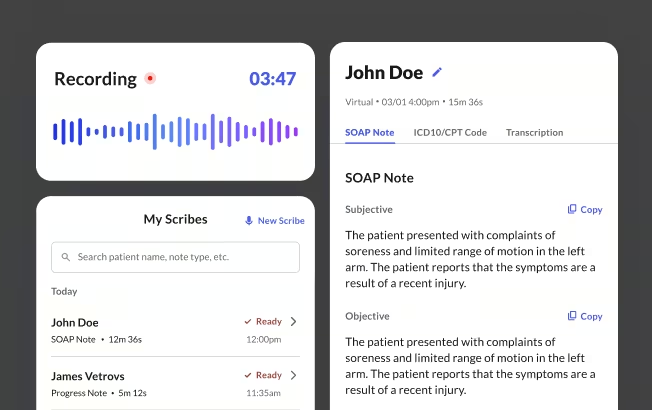
Commure Scribe is an AI medical scribe designed for solo clinicians and group practices. It captures the patient-provider conversation and generates a structured Subjective, Objective, Assessment, Plan (SOAP) note, with suggested ICD-10 and CPT codes, in seconds after the visit ends.
Workflow. The provider starts a recording at the beginning of the visit and ends it when the visit concludes. A structured note appears for review within seconds. The clinician edits where needed and finalizes. Commure Scribe stores and encrypts audio and uses it only to generate the clinical note. Notes are stored securely. Commure Scribe is HIPAA compliant and System and Organization Controls 2 (SOC 2) certified.
How it connects to intake. Commure Scribe captures what happens in the room. The ambient AI scribe captures more clinical reasoning and produces a more detailed note. The two workflows are additive: intake handles pre-visit data collection; the scribe handles in-visit documentation.
AI Copilot extends the same encounter into practice documentation. Most practices build new patient forms, work excuse letters, and prior authorization requests by hand, pulling from the same clinical information the visit already produced. AI Copilot generates those documents directly from the encounter. A provider who finishes a visit leaves with the clinical note, suggested codes, and any supporting documents the practice needs, all drafted from the same recording. AI Copilot also works outside the encounter. Practices can use it to draft and customize intake forms, consent documents, and other practice materials on demand.
New Patient Forms Template Download
Download a copy of this template
Thanks! Your template is ready.
Frequently Asked Questions
A new patient intake form is the set of documents a practice collects before or at a patient's first visit. It captures demographics, insurance information, medical history, the reason for the visit, and required consents.
At minimum, new patient forms should include: patient demographics, insurance and payment information, current medications and known allergies, relevant medical and family history, chief complaint and reason for visit, and consents (HIPAA acknowledgment, consent to treat, and financial responsibility agreement)
Start with the five core sections above. Remove any field without a clear use in the chart or billing workflow. Write field labels in plain language. Test digital forms on a mobile device before sending to patients. Confirm the platform will sign a BAA.
No federal law requires pre-visit completion, but most practices request it. Pre-visit completion improves efficiency and gives the clinical team time to review information before the encounter.
Yes. Most EHRs include a patient portal with digital intake capability. Standalone HIPAA-compliant form tools are also available. Pre-visit digital completion is now the standard approach in outpatient settings.
Sources
¹ American Medical Association. (n.d.). Private practice playbook: Sample forms. https://www.ama-assn.org/practice-management/ama-steps-forward-program/private-practice-playbook-sample-forms
² Frese, W., & Winkler, L. (2025). A guide to understanding common denial issues. Physician Leadership Journal, 12(1), 11–17. https://doi.org/10.55834/plj.6054827417
³ Reeves, J. J., Mekeel, K. L., Waterman, R. S., Rhodes, L. R., Clay, B. J., Clary, B. M., & Longhurst, C. A. (2020). Association of electronic surgical consent forms with entry error rates. JAMA Surgery, 155(8), 777–778. https://doi.org/10.1001/jamasurg.2020.1014
⁴ Sahlqvist, S., Song, Y., Bull, F., Adams, E., Preston, J., & Ogilvie, D. (2011). Effect of questionnaire length, personalisation and reminder type on response rate to a complex postal survey: Randomised controlled trial. BMC Medical Research Methodology, 11, 62. https://doi.org/10.1186/1471-2288-11-62
⁵ Centers for Medicare & Medicaid Services. (2022). No Surprises Act. U.S. Department of Health & Human Services. https://www.cms.gov/nosurprises
⁶ U.S. Department of Health & Human Services. (2024). Nondiscrimination in health programs and activities: Final rule. Federal Register, 89(88), 37522. https://www.federalregister.gov/documents/2024/05/06/2024-08711/nondiscrimination-in-health-programs-and-activities