



HIPAA Authorization (Release) Form Template: Free Download
A HIPAA authorization form, also called a HIPAA release form, is the signed document that lets a practice use or disclose protected health information (PHI) for purposes outside treatment, payment and health care operations.
Written by the Commure Scribe Team
Published: May 28, 2026
•
8 min read
Updated November 4, 2026
What You Need to Know About HIPAA Authorization Forms
- A HIPAA authorization form template, also called a HIPAA release form, lets patients authorize PHI uses and disclosures beyond treatment, payment, and operations. The template needs six core elements and three statements on revocation, redisclosure and no conditioning of treatment.
- Under 45 CFR 164.508(c), a valid HIPAA authorization must include six core elements and three required statements (often grouped as "nine required items" in compliance training).
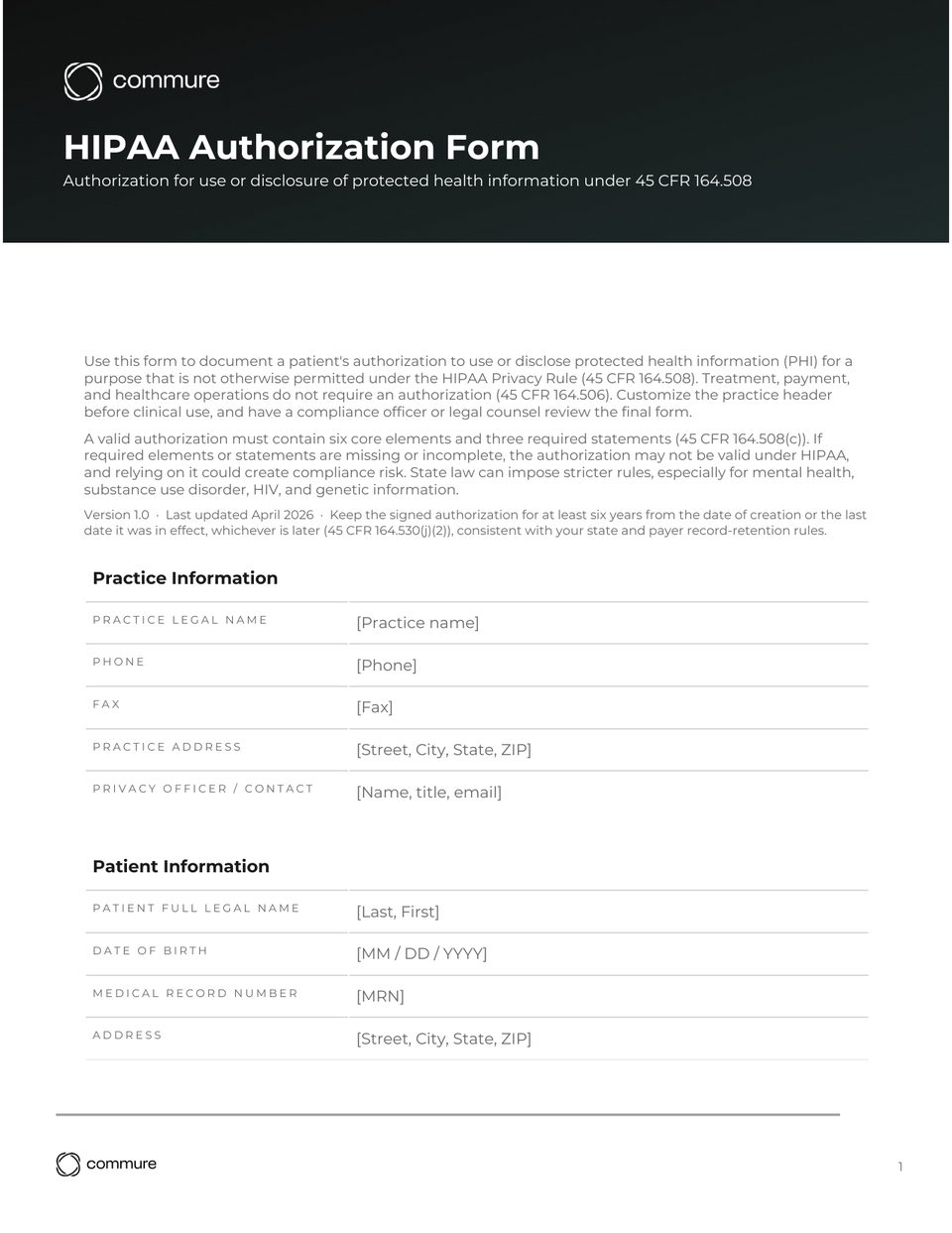
- The downloadable HIPAA authorization form template below includes all six core elements and three required statements as a HIPAA authorization form template ready to customize.
Download the HIPAA Authorization Form Template
Note: This template is for informational purposes only and does not constitute legal or medical advice. Have your compliance officer review it before clinical use.
Download the free HIPAA Authorization Form Template, fully editable Word document you can customize for your practice.
The sections below explain when an authorization is required, what the law requires every form to include, and how to fill in each field.
What Is a HIPAA Authorization or Release Form?
A HIPAA authorization is a narrow tool. It applies to uses and disclosures of protected health information (PHI) that the Privacy Rule does not otherwise permit (45 CFR 164.508(a))¹. In most cases, treatment, payment, and health care operations do not need one (45 CFR 164.506). State law may add stricter rules³.
The same document goes by several names. "HIPAA authorization form," "HIPAA release form," and "medical release form" all refer to the same thing: a signed form that lets a practice use or share a patient's PHI for a purpose the Privacy Rule does not already permit. This guide uses "authorization form," but this HIPAA authorization form template works for any of these.
Three forms often get blurred. First is the Notice of Privacy Practices, which tells patients how a practice uses their information by default (45 CFR 164.520)². Second is general consent for treatment, which covers a procedure or visit.
Third is a HIPAA authorization. This gives a practice permission to share specific records with a specific recipient for a specific reason. They are different forms with different rules.
Six core elements and three required statements appear in every valid HIPAA authorization form template (45 CFR 164.508(c))¹. Without all of the required elements and statements, the authorization may not be valid under HIPAA, and relying on it could create compliance risk. State law can impose stricter rules on top, especially for mental health, substance use, and HIV records. Check your state's rules before relying on any single template. For behavioral health records, a mental health release of information form pairs the clinical record release with a separate psychotherapy notes authorization.
When Do You Need a HIPAA Authorization Form?
Some uses of patient information need a signed authorization. Others fall under exceptions in the Privacy Rule (45 CFR 164.502)¹.
Practices do not need an authorization for these uses:
- Treatment, payment, or health care operations (45 CFR 164.506)³
- Certain public health, abuse-reporting, and required-by-law disclosures permitted under 45 CFR 164.512, subject to detailed conditions
- Certain emergency or disaster situations permitted under provisions such as 45 CFR 164.510 and 164.512, when conditions apply
- Disclosures to a personal representative the law recognizes
A signed HIPAA authorization form template is needed for these uses:
- Marketing communications, with limited exceptions (45 CFR 164.508(a)(3))¹
- Sale of PHI (45 CFR 164.508(a)(4))¹
- Most uses of psychotherapy notes (45 CFR 164.508(a)(2))¹
- In many cases, disclosures to a life insurer, employer, or non-representative family member, subject to specific HIPAA provisions and state law
Research sits in the middle. Most research uses of PHI need either a signed authorization or a waiver from an IRB or Privacy Board under 45 CFR 164.512(i)⁴ ⁵.
The most common case in outpatient practice is a record release. A patient asks the practice to send records to another provider, attorney, school, or family member. Under 45 CFR 164.508(c), the form must do four things. Describe the information. Name who may disclose it. Name who may receive it. State the purpose (or "at the request of the individual").
Very broad phrases like "any person" or "all records, anytime" may not be specific or meaningful enough under 45 CFR 164.508(c). Such phrasing can increase compliance risk. Work with compliance or counsel before using broad language.
When in doubt, treat the disclosure as needing an authorization. Document why an exception applies if one does (45 CFR 164.508(a)(1))¹.
What Should a HIPAA Authorization Form Include?
A valid HIPAA authorization form template has six core elements and three required statements (45 CFR 164.508(c))¹ ⁵. Skipping any required element or statement may render the authorization invalid under HIPAA, and relying on it could create enforcement or liability risk¹.
The six core elements:
- Description of the information. This describes the records being released. Be specific. "All records from January 2023 to present" beats "medical records."
- Name of the discloser. This is the practice or person making the disclosure. Use the legal name and address.
- Name of the recipient. This is the person or entity receiving the records. Match the legal name on the recipient's letterhead.
- Purpose of the disclosure. This explains why the records are being shared. "At the request of the patient" is allowed when the patient does not want to give a reason¹.
- Expiration date or event. This sets when the authorization stops. Use a date or an event tied to the purpose. Some organizations or state laws restrict open-ended or "indefinite" authorizations — follow your compliance policy.
- Signature and date. The patient signs and dates the form. A personal representative can sign instead, with a note on their authority.
The three required statements:
- Right to revoke. Patients can withdraw the authorization in writing at any time. The form must say so and explain how (45 CFR 164.508(c)(2)(i))¹.
- Redisclosure notice. Information sent under the authorization may be shared again by the recipient and lose HIPAA protection (45 CFR 164.508(c)(2)(iii))¹.
- No conditioning of treatment. A practice cannot refuse care, payment, or coverage because a patient declines to sign, with limited exceptions (45 CFR 164.508(b)(4))¹.
How Do You Fill Out a HIPAA Authorization Form?
Filling out a HIPAA authorization form template is a short list of decisions. Walk through the form top to bottom with the patient or have them complete it before the visit.
- Patient information. Use the patient's full legal name as it appears on insurance and records. Add date of birth and a medical record number if the practice uses one. A nickname or partial name slows down record retrieval and may break the match in the recipient's system.
- Records to be released. Write what is going out. Specific is safer than broad. For a single visit, name the date and provider. For an ongoing condition, name the date range and the type of records ("cardiology notes from 1/1/2024 to present"). Avoid "all medical records" unless the patient is asking for the entire chart and accepts that scope.
- Recipient. Write the legal name, mailing address, fax number, or email of the receiving party. If the patient is asking for records to be sent to themselves, name the patient as the recipient.
- Purpose. Use plain words. Examples: "continuing care," "school enrollment," "attorney representation," "workers' compensation claim." If the patient prefers not to say, write "at the request of the patient"¹.
- Expiration. Many organizations set standard timeframes (for example, 6–12 months) for routine authorizations, subject to any stricter state or organizational rules. For a one-time release, an event works ("upon completion of the school enrollment"). Follow your approved policy.
- Signature and date. The patient signs in front of a staff member or as part of a portal flow. A personal representative signs in their own name and notes their relationship.
If required elements or statements are missing or incomplete, the authorization may not be valid under 45 CFR 164.508. Relying on an invalid form may create compliance risk. Make sure all required sections are completed before disclosure¹.
What HIPAA Compliance Rules Apply to Authorization Forms?
A HIPAA compliance checklist for authorization forms covers three areas: how patients revoke, how recipients redisclose, and how long the practice keeps the form.
Revocation. A patient can revoke a HIPAA authorization in writing at any time (45 CFR 164.508(b)(5))¹. The exception is any disclosure the practice has already made in reliance on the form. Future disclosures stop when the practice receives the written revocation.
Log the date received, route a copy to the records team, and confirm in writing.
Redisclosure. Once records leave the practice, HIPAA may not protect them. The receiving party can share or use the records under its own rules. The form must include a redisclosure statement so patients know this before they sign (45 CFR 164.508(c)(2)(iii))¹.
Retention. A practice must keep the signed authorization for at least six years (45 CFR 164.530(j)(2)). The clock runs from the date of creation or the last date the form was in effect. Use the later of the two.
Some states need longer. Store the signed form in the patient record, scanned and indexed, with a way to retrieve it on audit.
State variability. Mental health, substance use, HIV, and genetic information often have stricter state rules than HIPAA. Certain substance use disorder records may also be subject to 42 CFR Part 2, which has additional consent and redisclosure rules.
Check your state's needs and your practice specialty before publishing a final HIPAA authorization form template.
Have a compliance officer or attorney review any HIPAA authorization form template before use.
How Do You Customize a HIPAA Authorization Template?
Customizing the HIPAA authorization form template means making it work for your practice without breaking what makes it valid.
Adapt the practice header. Replace bracketed fields with the legal name, address, phone, fax, and a privacy officer contact. Keep field labels generic so the same template works across providers and locations.
Match the capture mode to the workflow. Many practices keep multiple formats of the same form. Needs vary by organization:
- Paper for patients who prefer to fill it out at the front desk
- Editable PDF or DOCX for portal upload and email return
- A patient-portal form mirroring the paper version
A central owner for the template keeps versions in sync.
Plan storage and retrieval. Scan signed paper HIPAA authorization form template copies into the patient chart on the day of receipt. Index by date, recipient, and expiration. Build a tickler list for upcoming expirations.
Match practice size to ownership. Many practices assign one staff member to own patient intake forms. Larger groups may benefit from a named owner per location plus a quarterly check on the live HIPAA authorization form template version.
Note on AI scribes. A standard HIPAA authorization covers external disclosures. Many organizations treat recording a visit with an ambient AI tool as part of treatment, payment, or operations. The condition is a signed business associate agreement. Confirm with your compliance officer and counsel.
An AI scribe usually relies on three things. The Notice of Privacy Practices. A business associate agreement. State recording laws (45 CFR 164.506, 45 CFR 164.520)² ³. For a ranked breakdown by practice size and specialty, see the best AI medical scribes guide.
How Does Commure Scribe Fit Around Authorization Workflows?
A HIPAA authorization form template gets signed at the front desk or through the portal. The clinical work that follows happens in the room. Commure Scribe is an AI medical scribe that captures the encounter so the chart shows what was said and decided, not a clinician typing late at night.
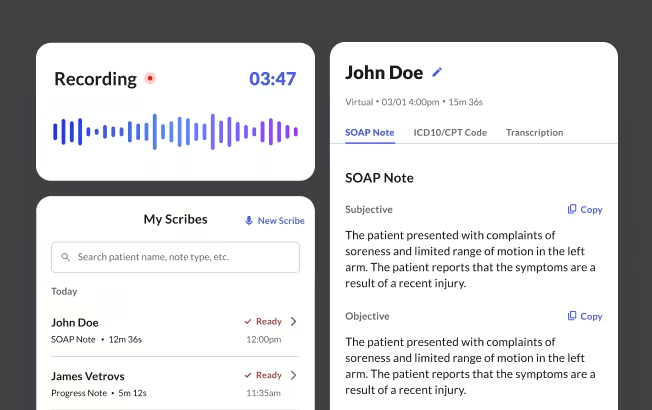
Scribe runs as ambient documentation. The clinician records the encounter, and shortly after recording ends, Commure Scribe generates a draft structured note, often in SOAP format, with suggested ICD-10 and CPT codes for review. The clinician edits and finalizes before anything posts. This matters for the authorization workflow: when a patient asks the practice to send records elsewhere, the visit notes are already done and carry enough clinical context for whatever the recipient needs.
Commure Scribe is designed to support HIPAA compliance and is System and Organization Controls 2 (SOC 2) certified, with onshore data storage, when used under a business associate agreement. Audio is encrypted in transit and at rest, and is not used to train external models. Commure currently offers a 7-day free trial with no credit card required; check the website for the latest details.
This article is for informational and educational purposes only, does not constitute legal, medical, or professional advice, and does not guarantee that any HIPAA authorization form template will satisfy every regulatory requirement that applies to your practice.
HIPAA Authorization Form Template Download
Download a copy of this template
Thanks! Your HIPAA authorization form template is ready.
Click below to download.

Frequently Asked Questions
A HIPAA authorization is valid until the expiration date or event the patient signs into the form. Some authorizations expire on a specific date. Others end when a triggering event occurs, like the close of a legal matter. A patient can also revoke the authorization in writing at any time. The exception is any disclosure the practice has already made in reliance on the form.
A HIPAA authorization and a general consent for treatment are separate documents. General consent for treatment covers a procedure or visit and is governed by state law. A HIPAA authorization gives a practice permission to use or share protected health information (PHI) for purposes the Privacy Rule does not already permit. Examples include sharing records with a third party outside care.
A general HIPAA release form is valid when it contains the six core elements and three required statements in 45 CFR 164.508(c). Generic wording such as "all records to any person" may not describe the information or the recipient specifically enough. Name the records, the recipient and an expiration date or event, then check your state's stricter rules.
In most outpatient settings, no separate HIPAA authorization is typically required. Many organizations treat recording a visit with an AI medical scribe as part of treatment, payment, and operations. The condition is a signed business associate agreement. State recording laws may still apply. Confirm with your compliance officer and counsel.
Yes, when the power of attorney is recognized by state law as a personal representative for healthcare decisions. The representative signs in their own name and notes their authority. Keep a copy of the POA or supporting document in the patient record. State rules vary on which POAs qualify.
Sources
- Electronic Code of Federal Regulations. 45 CFR § 164.508 — Uses and disclosures for which an authorization is required. https://www.ecfr.gov/current/title-45/subtitle-A/subchapter-C/part-164/subpart-E/section-164.508 (current)
- U.S. Department of Health and Human Services. Notice of Privacy Practices for Protected Health Information. https://www.hhs.gov/hipaa/for-professionals/privacy/guidance/privacy-practices-for-protected-health-information/index.html (n.d.)
- Electronic Code of Federal Regulations. 45 CFR § 164.506 — Uses and disclosures to carry out treatment, payment, or health care operations. https://www.ecfr.gov/current/title-45/subtitle-A/subchapter-C/part-164/subpart-E/section-164.506 (current)
- U.S. Department of Health and Human Services. Institutional Review Boards (HIPAA Research Guidance). https://www.hhs.gov/hipaa/for-professionals/special-topics/research/institutional-review-boards/index.html (n.d.)
- University of Wisconsin–Madison Institutional Review Board. Writing a HIPAA Authorization Form. https://irb.wisc.edu/manual/investigator-manual/preparing-supporting-documents/writing-a-hipaa-authorization-form/ (n.d.)