



Best EHR for Solo Practice in 2026: 10 Platforms Compared
A side-by-side comparison of 10 EHRs for the 1-provider practice, with pricing models, self-managed billing trade-offs, free and low-cost paths, and a checklist to test fit before you sign.
Written by the Commure Scribe Team
Published: June 14, 2026
•
15 min read
What You Need to Know About the Best EHR for Solo Practice
- This guide is for solo practitioners running a 1-provider practice. Independent clinics with 2–9 providers: see Best EMR for Small Practice.
- Physicians report 1 to 2 hours of after-hours EHR work nightly, so cost and usability drive the choice more than feature count².
- Shortlist two platforms from the comparison below, then demo both with your own patient cases before you sign.
How Do the 10 Best EHRs for Solo Practice Compare?
The 10 best EHRs for solo practice in 2026 are Practice Fusion, Tebra, DrChrono, athenahealth, eClinicalWorks, NextGen Office, CharmHealth, SimplePractice, TherapyNotes, and Elation Health. The table compares them on the seven factors solo buyers weigh most.
For a broader market view beyond solo practice, see this guide to the best EMR software. Pricing models change often. Confirm details on each vendor site.
One pattern stands out in this best EHR for solo practice comparison: billing is the real price variable. athenahealth ties cost to collections, while most others charge flat per-provider rates.
What Are the 10 Best EHRs for Solo Practice?
The best EHR for solo practice depends on specialty, billing model, and budget, so each profile below maps those three. Each also covers trade-offs for a solo buyer.
Pricing notes reflect each vendor's published model, not a verified quote. Treat them as starting points for your own demo questions.
1. Practice Fusion
Practice Fusion is the budget pick for the best EHR for solo practice when simplicity matters most. It began as the dominant free EHR for one-to-three-clinician practices and now sells a low-cost per-provider subscription with an optional billing bundle⁵. Its template library spans more than 40 specialties and adapts to how a clinician charts⁵.
- Key features: Specialty charting templates and ePrescribing. Also lab links, a patient portal, and quality reporting.
- Best for: Solo and small practices that want minimal setup. The low monthly cost suits new offices.
- Trade-offs: Telehealth is not a core strength. Advanced analytics lean on the broader Veradigm ecosystem.
2. Tebra (formerly Kareo)
Tebra makes the case for an all-in-one EHR for solo practice owners: charting, billing, scheduling, and patient marketing in one login⁶. Kareo, its predecessor, won Best in KLAS for small-practice ambulatory EMR and practice management in 2021⁶. Pricing is per provider and quote-based, with a managed billing tier for practices that outsource claims.
- Key features: Customizable note templates and EPCS ePrescribing. Also integrated telehealth, reputation tools, and billing analytics.
- Best for: Solo practitioners who want billing and patient acquisition in one system. The single login cuts tool sprawl.
- Trade-offs: Quote-based pricing slows comparison shopping. The marketing features add cost a charting-focused clinician may not use.
3. DrChrono
DrChrono is the best EHR for solo practice charting on a tablet, built natively for iPad and iPhone. Tiered per-provider subscriptions run from basic charting up to plans that add billing and managed revenue cycle management (RCM). Custom forms, speech-to-text, and broad lab connectivity round out the clinical side.
- Key features: iPad-native charting and customizable templates. Also EPCS ePrescribing, prior authorization support, and AI no-show prediction.
- Best for: Clinicians who chart on a tablet at the point of care. House-call and concierge practices fit well.
- Trade-offs: Desktop workflows feel secondary. Useful features cluster in higher tiers.
4. athenahealth
athenahealth's athenaOne is the best EHR for solo practice billing that the owner wants off their desk. Pricing leans on a percentage of collections rather than a flat fee⁷. The network model pushes payer-rule updates to all practices automatically, so a solo owner is not maintaining billing rules alone⁷.
- Key features: Integrated RCM and network-updated claim rules. Also specialty templates, athenaTelehealth, and a patient portal.
- Best for: Solo practices with heavy insurance billing. It suits owners who want collections handled.
- Trade-offs: Percentage-of-collections pricing costs more as the practice grows. The platform is broader than a one-clinician office strictly needs.
5. eClinicalWorks
eClinicalWorks is the best EHR for solo practice specialists who need depth in their field. It provides tools for more than 40 specialties on a single database linking charts, billing, and claims⁸. The vendor reports more than 850,000 medical professionals on the platform⁸. Published per-provider subscription tiers keep entry costs visible, and eCW AI adds built-in ambient charting.
- Key features: 40+ specialty configurations and integrated billing. Also the healow patient app, telehealth, and population health tools.
- Best for: Solo specialists who want enterprise-grade depth. Entry pricing stays at small-practice levels.
- Trade-offs: The feature surface is large, so setup and training take longer. Some advanced modules add per-feature fees.
6. NextGen Office
NextGen Office is the best EHR for solo practice owners who plan to grow, scoped for one to ten physicians. Specialty "blueprints" pre-configure workflows by field, and ambient listening for AI-generated Subjective, Objective, Assessment, Plan (SOAP) notes is built in. Pricing is quote-based per provider.
- Key features: Specialty blueprints and built-in ambient AI notes. Also integrated RCM, patient self-scheduling, and EPCS ePrescribing.
- Best for: Solo specialists who expect to add providers. NextGen Enterprise gives them a clear upgrade path.
- Trade-offs: Pricing is quote-based, and the sales process is heavier than self-serve rivals. Solo buyers carry features sized for ten-physician groups.
7. CharmHealth
CharmHealth is the best EHR for solo practice startups watching every dollar. Practices license the EHR, practice management, telehealth, and RCM pieces separately and skip what they do not need¹⁰. That modular structure keeps entry costs low for solo practice launches; confirm current plan terms on the vendor's pricing page.
- Key features: Customizable SOAP templates and integrated telehealth with screen sharing. Also ePrescribing to 70,000+ pharmacies and a Fast Healthcare Interoperability Resources (FHIR) R4 API¹⁰.
- Best for: New or part-time solo practices that want to start cheap. Modules can be added as volume grows.
- Trade-offs: Watch the line items in modular pricing. Costs rise as modules and visit volume grow.
8. SimplePractice
SimplePractice is the best EHR for solo practice therapists, serving more than 200,000 private-practice clinicians⁹. Published tiers (Starter, Essential, Plus) price per clinician, and credentialing help is included at signup⁹. Telehealth launches straight from the calendar with no separate login.
- Key features: Therapy note templates and integrated teletherapy. Also insurance billing with ERA support and Cures Act-compliant patient data export⁹.
- Best for: Solo therapists, counselors, and psychologists. It carries the lightest admin load in this set.
- Trade-offs: It is built for behavioral health and wellness, so medical specialties will find gaps. Third-party interoperability is limited by design.
Therapists weighing more options can compare the best EHR for mental health private practice picks.
9. TherapyNotes
TherapyNotes is a strong EHR for solo practice therapists who want structure above all. Its templates follow the clinical sequence from intake to progress notes to termination. According to TherapyNotes, the platform prices per clinician and includes scheduling, a patient portal, telehealth, and insurance billing¹¹.
- Key features: Structured behavioral health note types and integrated billing. Also telehealth, appointment reminders, and a patient portal.
- Best for: Solo therapists who want notes to enforce a consistent clinical structure. The workflow guides note order.
- Trade-offs: Like SimplePractice, it stays inside behavioral health. Confirm certification status and current features with the vendor.
10. Elation Health
Elation Health is the best EHR for solo practice primary care, including direct primary care and concierge models¹². Elation positions its design around reducing physician burnout and protecting the patient-facing part of the visit¹². Pricing is per provider, with billing available as an integrated module.
- Key features: Clinical-first charting and AI-native note assistance. Also EPCS ePrescribing, Zoom-powered telehealth, and DPC membership workflows¹².
- Best for: Solo primary care physicians. DPC and concierge practices leaving insurance-heavy workflows fit best.
- Trade-offs: The primary care focus means thinner support for procedural specialties. Practices that want heavy built-in RCM may prefer athenahealth.
What Does a Solo Practice EHR Actually Need to Do in 2026?
A solo practice EHR has to carry five jobs on one license: charting, ePrescribing, billing, telehealth, and patient communication. There is no IT department behind it. The same clinician who sees patients also vets the software, signs the contract, and calls support.
By 2024, 95% of office-based physicians had adopted an EHR¹. The question is no longer whether to buy one but which one fits a one-clinician operation. That nightly after-hours chart load lands on one person, with no partner to share the inbox².
The search for the best EHR for solo practice has to follow that one-clinician reality. The selection criteria, side-by-side table, costs and trade-offs, free options, and pre-signing tests below do.
Pricing changes often, so confirm figures on each vendor's site. Practices planning to add a second or third provider can also compare the best EMR for small practice picks.
How Were These 10 Platforms Selected?
Any ranking of the best EHR for solo practice should show its criteria, so here are the three used. Each platform had to clear the full screen:
- Solo-practice fit. The vendor explicitly serves solo or small practices in its own materials. Onboarding has to be something one clinician can run without IT staff.
- Specialty span. The set covers primary care, multi-specialty, and behavioral health. Most solo practitioners should find two candidates in their field.
- Pricing transparency. Vendors that publish per-provider pricing ranked ahead of quote-only ones. Hidden pricing costs a solo buyer time.Documentation load sits behind this whole comparison: physicians who use EHRs report lower satisfaction with clerical work and higher burnout risk³. Certification was treated as a floor, not a differentiator. Each platform on the list is ONC-certified per its own published materials. That matters for Centers for Medicare & Medicaid Services (CMS) programs that need certified EHR technology⁴.
Feature claims were drawn from vendor materials current as of March 2026, not bench-tested here. Where a claim comes from the vendor alone, the profile says so. No single product is the best EHR for solo practice across all specialties. This is a buying guide built from published evidence.
What Free and Low-Cost EHR Options Exist for Solo Practitioners?
A truly free EHR for solo practice is now rare, but three low-cost paths remain. Each trades money for time, risk, or both. For a low-volume office, the best EHR for solo practice may be the cheapest one that exports cleanly.
- Free and entry tiers. Practice Fusion, once the dominant free EHR, moved to a paid per-provider model⁵. Where free tiers still exist, they usually cap encounters, storage, or support. Confirm current terms on the vendor's pricing page.
- Low-volume and per-encounter pricing. CharmHealth's modular model starts small. A practice licenses a minimal footprint and adds pieces later¹⁰. Entry plans priced to visit volume suit part-time, new, or cash-pay practices. The math flips at full volume. Flat per-provider plans then cost less.
- Open-source software. OpenEMR is free to license and ONC-certified per its project materials¹³. The cost shifts to hosting, setup, updates, and security. The practice arranges those itself or buys them from a support firm¹³.
The risks of free deserve equal weight. Support is the first gap. A solo practitioner with a down system has no IT staff, and free plans may have no hotline.
Data is the second. Before adopting any free or low-cost EHR, confirm how patient records export if you leave. SimplePractice and Elation both publish 21st Century Cures Act information blocking compliance⁹ ¹². Ask any vendor to show the export in a demo.
The third risk is lock-in by accumulation. The longer charts live in a system that is hard to leave, the more a "free" EHR costs to exit. For the best EHR for solo practice value, a low-cost paid plan with clear export tools often beats free.
How Do You Evaluate an EHR Before Committing?
Find the best EHR for solo practice use by testing your own workflow, not the vendor's demo script. Usability varies widely even between certified systems. A multi-center study found up to nine-fold differences in task time and eight-fold differences in clicks¹⁸.
Federal patient-safety research has also linked EHR usability problems to safety events¹⁹.
Four tests separate fit from regret:
- Run a real visit in the demo. Bring two of your own de-identified cases. Chart them end to end. Include the orders and the bill.
- Time the chart. For each case, count the minutes from room exit to signed note. Compare across vendors with the same cases.
- Test data portability. Ask the vendor to export a complete patient record in front of you. Confirm the format and what it costs.
- Probe support. Call the support line during the trial, after hours, before you sign. The response you get as a prospect is the best you will ever get.
Contract terms deserve the same scrutiny. Confirm the total monthly cost with each module you need, not the base tier. Ask what happens to your data at termination and how long export access lasts.
The best EHR for solo practice owners is one they can also afford to leave. The exit terms matter as much as the entry price.
Where Does an EHR Stop Helping With Documentation?
Even the best EHR for solo practice stores and structures the note; it does not write the note. Templates, macros, and speech-to-text speed data entry, but the clinician still translates the visit into structured text.
That gap is where most chart time lives. In a time-motion and event-log study, primary care physicians spent 5.9 hours of an 11.4-hour workday in the EHR¹⁴. Clerical and admin tasks, including charting, order entry, and billing, took up 44.2% of that EHR time¹⁴.
The design of the system shapes the burden. A JAMA Network Open survey of 282 ambulatory clinicians tied stress and burnout to specific EHR factors¹⁵. Those factors included excessive data entry, note bloat, and notes geared toward billing¹⁵. A separate 2024 study of more than 10,000 family physicians linked perceived appropriate home EHR time to 0.58 times the odds of burnout¹⁶.
Ambient AI scribes fill this gap. They capture the visit conversation and draft a structured note. The clinician reviews and approves it before it enters the record. They sit on top of the EHR rather than replacing it, which is why each platform above pairs with them.
The evidence base is still forming. A registered randomized trial is testing whether an ambient AI scribe cuts charting burden and improves physician well-being¹⁷. For solo practitioners, the practical takeaway is to evaluate the EHR and the charting layer as separate purchases. For a guide on the tools, see the AI medical scribe and for a ranked breakdown by practice size and specialty, see our best AI medical scribes guides.
How Does Commure Scribe Work With a Solo Practice EHR?
Commure Scribe is the documentation layer that works over any EHR on this list. It is an ambient AI scribe with 60+ EHR integrations, and solo and small practices (1–5 providers) use copy/paste to move notes into the chart. That lets a solo practitioner pick the best EHR for solo practice on its own merits, then solve charting speed separately.
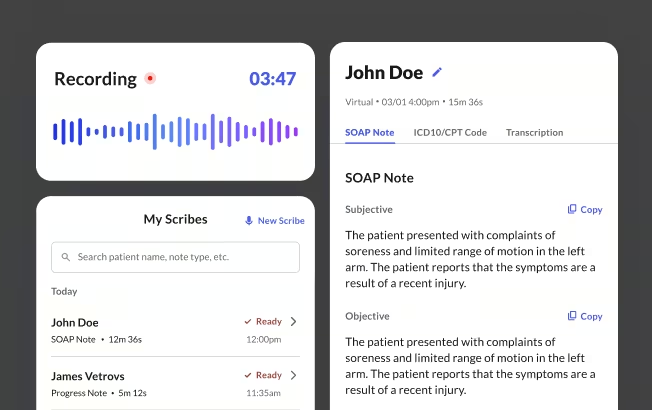
The workflow is Capture, Edit, Finalize. After End Recording, a structured SOAP note appears within seconds, with suggested ICD-10 and CPT codes. The clinician always has the option to review before the note enters the chart, which keeps them in the loop for billing. Per internal survey data, 90%+ of providers reduce clinical documentation time and digital fatigue, and clinicians report a 43-second average chart close time.
Pricing is transparent. Solo and small practices get a 7-day unlimited trial with no credit card, then $89/mo, or $59/mo billed annually, with unlimited transcription, custom templates, AI Copilot, and suggested ICD-10/CPT codes. A solo practitioner can run the trial against their current EHR within a week and measure the chart-time change directly. Current rates are on the Commure scribe pricing page.
This article is for informational and educational purposes only, does not constitute legal, medical, or professional advice, and does not guarantee the suitability, pricing, or performance of any EHR platform.
Frequently Asked Questions
Yes. The range in this guide spans from near-zero per-encounter cost to mid-market platforms in the $150 to $450 per-provider per-month range. For a practice with 15 to 20 visits per day, even a $300/month platform costs less than $1 per visit in platform fees. The more relevant cost questions are how much revenue is lost to billing errors and how many hours are lost to documentation. Both are areas where the right platform can deliver a return.
The clinician reviews and finalizes the note before it enters the record. The standard for billing and malpractice is that the signed note reflects the clinician's review and attestation. That standard is the same whether the draft was produced by an AI scribe or dictated to a human transcriptionist. Consult your malpractice carrier and billing team on your specific documentation requirements, particularly for high-complexity visits or E&M coding.
No. Most ambient AI scribes work alongside your existing EHR rather than replacing it. The scribe captures the clinical conversation, creates a structured note, and the clinician pastes or syncs it to the EHR record. If your current platform is functionally sound and documentation burden is the primary pain, testing an AI scribe layer first is lower-risk and faster to deploy than switching platforms.
The 21st Century Cures Act requires certified EHR vendors to support patient data export. They may not engage in information blocking.³ In practice, data migration between platforms varies in complexity. Confirm before signing that your vendor will export records in a standard interoperable format. Confirm that your new platform can import them without manual re-entry.
A basic EHR provides templates, macros, and possibly speech-to-text to help clinicians enter documentation faster. An AI-native EHR goes further. It uses machine learning to suggest note structure, flag potential coding, surface care gaps, and sometimes generate a draft note. The more practical question is whether the AI features work within your visit workflow without adding steps.
For cloud-based platforms with good vendor support, most independent practices are operationally live within 2 to 4 weeks. Practices with complex specialty templates, large patient panels being migrated, or multi-payer billing setups typically take 4 to 8 weeks to reach full productivity. Vendor-provided onboarding support shortens this considerably. Ask for a specific onboarding timeline before committing.
Sources
- CDC/National Center for Health Statistics, National Electronic Health Records Survey (NEHRS) Results, https://www.cdc.gov/nchs/nehrs/results/index.html, 2024.
- Sinsky C, et al. Allocation of Physician Time in Ambulatory Practice: A Time and Motion Study in 4 Specialties. Annals of Internal Medicine, https://pubmed.ncbi.nlm.nih.gov/27595430/, 2016.
- Shanafelt TD, et al. Relationship Between Clerical Burden and Characteristics of the Electronic Environment With Physician Burnout and Professional Satisfaction. Mayo Clinic Proceedings, https://pubmed.ncbi.nlm.nih.gov/27313121/, 2016.
- CMS, CY 2024 Medicare Promoting Interoperability Program Requirements, https://www.cms.gov/files/document/2024-medicare-promoting-interoperability-requirements-infographic.pdf, 2024.
- Practice Fusion, Physician Specialties, https://www.practicefusion.com/ehr/physician-specialties/, 2026.
- Tebra, Kareo Named Best in KLAS for Small Practice Ambulatory EMR/PM, https://www.tebra.com/press-release/kareo-named-best-in-klas-for-small-practice-ambulatory-electronic-medical-records-practice-management-solutions, 2021.
- athenahealth, Why athenaOne EHR Works for Multispecialty Practices, https://www.athenahealth.com/resources/blog/why-athenaone-ehr-works-multispecialty-practices, 2026.
- eClinicalWorks, https://www.eclinicalworks.com, 2026.
- SimplePractice, https://www.simplepractice.com, 2026.
- CharmHealth, Charm EHR, https://www.charmhealth.com/ehr/
- TherapyNotes, https://www.therapynotes.com
- Elation Health, EHR Solutions, https://www.elationhealth.com/solutions/ehr/, 2026.
- OpenEMR Project, OpenEMR Features, https://www.open-emr.org/wiki/index.php/OpenEMR_Features
- Arndt BG, Beasley JW, Watkinson MD, Temte JL, Tuan W-J, Sinsky CA, Gilchrist VJ. Tethered to the EHR: Primary Care Physician Workload Assessment Using EHR Event Log Data and Time-Motion Observations. Annals of Family Medicine, https://pmc.ncbi.nlm.nih.gov/articles/PMC5593724/, 2017.
- Kroth PJ, Morioka-Douglas N, Veres S, et al. Association of Electronic Health Record Design and Use Factors With Clinician Stress and Burnout. JAMA Network Open, https://jamanetwork.com/journals/jamanetworkopen/fullarticle/2748054, 2019.
- Rotenstein LS, Hendrix N, Phillips RL Jr, Adler-Milstein J. Team and Electronic Health Record Features and Burnout Among Family Physicians. JAMA Network Open, https://jamanetwork.com/journals/jamanetworkopen/fullarticle/2825642, 2024.
- ClinicalTrials.gov, Ambient AI Scribe (Voa Health) in Outpatient Clinics: Draft Notes for Physician Use, NCT07302906, https://clinicaltrials.gov/study/NCT07302906, 2025.
- Ratwani RM, Savage E, Will A, et al. A Usability and Safety Analysis of Electronic Health Records: A Multi-Center Study. Journal of the American Medical Informatics Association, https://academic.oup.com/jamia/article-abstract/25/9/1197/5047907, 2018.
- AHRQ, Improving Electronic Health Record Usability for Patient Safety, https://digital.ahrq.gov/program-overview/research-stories/improving-electronic-health-record-usability-patient-safety, 2020.



.jpeg)

.jpeg)
.jpeg)

.jpeg)