



Medical History Form Template: Free Editable Download
A free, editable medical history form template plus a plain-English guide on what to include, how patients and staff fill it out, and which HIPAA and CMS rules apply.
Written by the Commure Scribe Team
Published: June 3, 2026
•
8 min read
Updated June 3, 2026
What You Need to Know About Medical History Forms
- A medical history form is typically a patient-completed intake document that captures clinical history, demographics, and (often) consent-related fields.
- A large share of diagnostic errors in primary care are linked to gaps in history-taking and information synthesis.¹
- Download the editable template below to launch a nine-section medical history form built around common HIPAA-relevant fields.
Download the Medical History Form Template
This article is for general education and does not constitute legal, medical, or professional advice. Have your compliance officer or legal counsel review the form before use.
- Download the Medical History Form Template. Editable nine-section form with common HIPAA-relevant consent and signature fields.
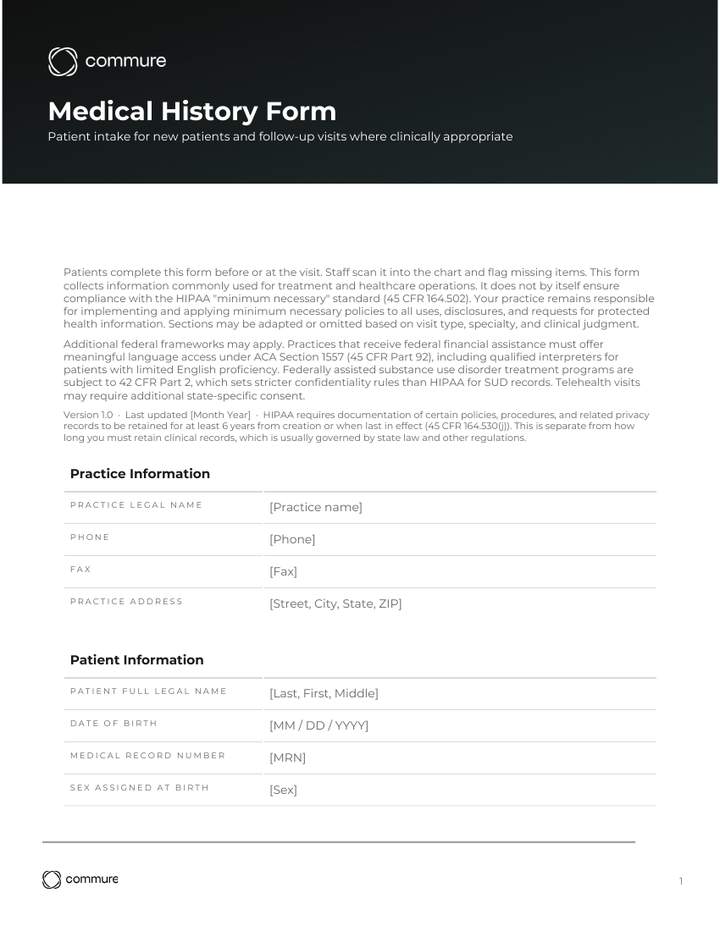
Use the template as a starting point and adapt the fields, branding, and language to your specialty and state requirements.
What Is a Medical History Form, and When Do You Use One?
A medical history form is commonly used at the start of new patient visits in independent and group practices. Practices update it on follow-ups. This template organizes the form into nine common sections. The sections cover demographics through medications, allergies, and review of systems.² This form sits within a wider library of free medical form templates covering patient intake, clinical notes, consent, billing, and behavioral health.
Two federal frameworks shape how practices handle the form. HIPAA is the federal patient privacy law. Its "minimum necessary" standard applies to most uses and disclosures of patient data.³ The standard generally does not apply to disclosures for treatment. Practices typically design forms to avoid unnecessary data collection. Centers for Medicare & Medicaid Services (CMS) is the Medicare and Medicaid agency. Under the current E/M guidelines for office and outpatient visits, the documented history must be medically appropriate. Code selection is based on medical decision-making or total time.⁴
A medical history form differs from the clinical note. The medical history form captures patient input. The note is the clinician's record built from that input plus the exam. The sections below cover what the medical history form should include and how patients and staff fill it out. They also cover the rules that apply and how to modernize the workflow.
What Should a Medical History Form Include?
A complete medical history form has two parts. The clinical part captures what patients tell the clinician. The administrative part typically covers identification, consent (as required by state law or practice policy), and insurance information needed for billing. Skipping a required field can delay care, miss a safety risk, or weaken the chart for billing review.
Clinical sections (drawn from standard medical-history teaching):²
- Chief complaint. The single reason for the visit, in the patient's own words. It anchors the rest of the note.
- History of present illness (HPI). When the symptom started, what makes it better or worse, and any prior treatment. HPI drives the differential diagnosis.⁵
- Past medical history (PMH). Active and past conditions like hypertension, diabetes, or asthma. PMH flags risks the chief complaint may not show.
- Past surgical history (PSH). Prior operations and dates. PSH affects anesthesia choice, imaging plans, and current symptom workup.
- Medications and allergies. Drug name, dose, frequency, and any drug or non-drug reaction. Incomplete medication histories are a common source of preventable adverse drug events.⁶
- Family history. Conditions in first-degree relatives, like cardiac disease, cancer, or diabetes. Family history is essential for risk assessment.⁷
- Social history. Tobacco, alcohol, substance use, occupation, and living situation. These drive prevention and care planning.⁷
- Review of systems (ROS). A checklist of symptoms by organ system. ROS catches issues the chief complaint did not surface.
Common administrative sections (typical of HIPAA-aware intake forms):
- Patient name, date of birth, and contact information.
- Emergency contact name and phone number.
- Insurance details (carrier, plan, member ID).
- Notice of Privacy Practices (NPP) acknowledgment with signature and date.
- Patient or guardian signature line.
Forms should typically avoid collecting unnecessary patient information. This aligns with the HIPAA "minimum necessary" standard (see our HIPAA compliance checklist for more). The standard applies to many uses and disclosures of PHI. It generally does not apply to disclosures for treatment.
How Do Patients and Staff Fill Out a Medical History Form?
Patients fill out the form before or at the visit. Staff review it for completeness, scan it into the chart, and flag missing items. The clinician then confirms chief complaint, medications, and allergies at the start of the visit. Pre-visit completion saves clinic time and improves note quality.⁸
Patient fill-out steps:
- Pick up the form at check-in or open it in the patient portal at home. Earlier completion gives more time for accurate answers.
- Use the patient's own words in the chief complaint field. Write "back pain since lifting boxes," not a guessed diagnosis.
- List every drug, including over-the-counter and supplements. Include the dose and how often. Skipped or partial entries undermine safety review later in the visit.
- Mark each allergy with the reaction. Write "Penicillin: rash," not "Penicillin: yes."
- Check every box that applies on family and review-of-systems sections. "I don't know" is a valid answer for family history.
- Sign and date the bottom of the form. Adults sign for themselves. A parent or guardian signs for minors.
Staff steps after the patient hands the form back:
- Scan for blanks in required fields (chief complaint, medications, allergies, signature).
- Ask the patient about any blanks before they leave the front desk.
- Enter or scan the form into the electronic health record (EHR) the same day.
- Flag new diagnoses, medications, or allergies for the clinician to confirm.
Clinician steps in the room:
- Read the chief complaint back to confirm. This catches transcription errors.
- Reconcile the medication list face to face. Ask "Are you still taking everything on this list?"
- Update the social history with any change since the last visit.
What HIPAA and CMS Rules Apply to Medical History Forms?
Two federal frameworks shape how practices handle medical history forms. HIPAA governs the privacy, security, and documentation of patient data. CMS evaluation and management guidelines shape what the documented history must support for billing. State law often adds requirements on top of both.
HIPAA: what the form may ask and how to store it
- Avoid collecting more than the visit needs. The HIPAA "minimum necessary" standard (45 CFR 164.502) applies to many uses and disclosures of patient data, although it generally does not apply to disclosures for treatment. Long, broad questionnaires can create patient burden and may raise minimum-necessary concerns in some contexts.
- Apply reasonable safeguards to electronic forms (45 CFR 164.312). Encryption in transit and at rest is the industry-standard way to meet these expectations under the Security Rule. Paper forms need locked cabinets and restricted access.
- Provide a Notice of Privacy Practices (NPP) at the first visit. Make a good-faith effort to obtain written acknowledgment (45 CFR 164.520). Many practices document this on the intake form near the signature line.
- Retain HIPAA privacy documentation for at least six years from creation or the date last in effect (45 CFR 164.530(j)).³ State medical-record retention laws may require longer for forms kept as part of the medical record.
- Follow state law for minor consent. In many states, adults age 18 and over sign for themselves and a parent or legal guardian signs for minors. Consent requirements (including when minors can consent for their own care) vary by state and service type.
CMS: what the documented history affects
- Visit-level support. Under the 2021+ E/M guidelines for office and outpatient visits, code selection is based on medical decision-making or total time.⁴ The history must still be medically appropriate and recorded in the chart.
- Document a medically appropriate history. For high-complexity visits, clinicians typically document a clear chief complaint, history of present illness, and any additional history needed to support medical decision-making.
Other federal and state frameworks
- State patient-rights laws. Some states require extra disclosures around mental health, reproductive care, or HIV testing. Check your state's rules.
- 42 CFR Part 2. Federally assisted substance use disorder treatment programs have stricter confidentiality rules for SUD records than HIPAA alone. If your practice is a Part 2 program, do not disclose SUD information from the intake form without patient consent that meets Part 2 requirements.
- ACA Section 1557 (45 CFR Part 92). Practices that receive federal financial assistance must give patients with limited English proficiency meaningful access through qualified interpreters and translated materials. Asking the language and interpreter questions on the form is the first step, not the last.
- Specialty boards. Some specialty boards add fields beyond the federal minimum.
This article is for general education. A medical history form alone does not make a practice HIPAA compliant. Have your compliance officer or legal counsel review the form before use.
How Can Practices Modernize Their Medical History Workflow?
Modern medical history workflows replace paper handoffs with digital intake before the visit, then carry that data into the clinical note without rekeying. The goal is one capture, multiple uses: the patient enters history once, staff verify it, and the clinician picks it up in the room. This cuts double documentation and frees clinician attention for the encounter itself.
Why the upgrade matters:
- Diagnostic risk drops with better information gathering. Most diagnostic errors in primary care trace back to gaps in history-taking and information synthesis.¹ Richer, more accurate forms give the clinician better data.
- Medication reconciliation is a defined safety process. AHRQ defines it as the formal review of all medications a patient is taking at every transition of care.⁹ A current, accurate med list on the form is the starting point.
Workflow shifts for independent and group practices:
- Default to portal intake instead of clipboard handoffs. Front-desk staff stop chasing paper, and forms arrive complete more often.
- Pre-populate fields from the prior visit. Patients confirm or update rather than starting from blank.
- Pull intake data directly into the EHR. A form that lives only on paper creates a second documentation step.
- Use AI-assisted documentation in the room. Ambient scribing can capture the clinician's verbal confirmation of history and add it to the note without typing during the visit. Any vendor that handles patient audio or notes is a HIPAA business associate and must sign a Business Associate Agreement before use.
- Pick one workflow that scales. Solo practices benefit from portal intake. Larger groups benefit from EHR integration and ambient capture used the same way across providers.
How Commure Scribe Connects Patient Intake to the Clinical Note
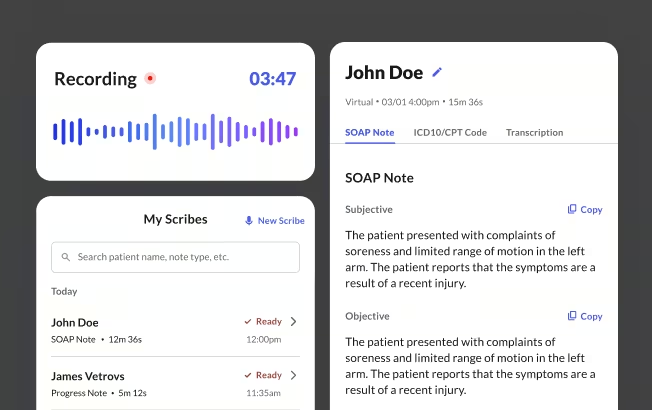
Medical history forms collect what the patient brings to the visit. The clinician's job is to take that input, ask follow-up questions, and turn the conversation into a chart-ready note. Commure Scribe is an ambient AI medical scribe. It listens to the visit, drafts the note, and gives clinicians time back at the end of the day.
Commure Scribe works alongside whatever intake form a practice already uses. Patients fill out the medical history form on the portal or paper. Staff verify it. Commure Scribe then captures the in-room conversation when the clinician confirms history, asks follow-up questions, and reasons through the plan. When the clinician clicks End Recording, a structured note appears within seconds with suggested ICD-10 and CPT codes ready for review. The workflow is Capture → Edit → Finalize: the clinician always has the option to review and approve the note before it posts.
Highlights for independent and group practices:
- Patient presence in the room. Clinicians can put down the computer and actively listen during the history confirmation, then review the draft note after.
- One-click sync with 60+ EHR integrations for medium and large group practices. Many solo and small practices use copy/paste workflows. Named EHRs include AdvancedMD, Athenahealth, Elation, eClinicalWorks, and SimplePractice.
- HIPAA compliant, SOC 2 certified, onshore data storage. Audio and notes are encrypted in transit and at rest. Commure retains audio for at least six years and does not use it for AI training. Confirm specific retention terms in your Business Associate Agreement.
- Suggested ICD-10 and CPT codes appear in a separate tab for the clinician to confirm.
Disclaimer
This article and the companion template are for information and education only. They are not legal, medical, or compliance advice, and using the template does not guarantee compliance with HIPAA, CMS, or state regulations. Talk to qualified legal and compliance counsel for your specific situation.
Medical History Form Template Download
Download a copy of this template
Thanks! Your medical history form template is ready.
Click below to download.

Frequently Asked Questions
Yes, in the sense that HIPAA's Privacy and Security Rules apply to any covered entity or business associate handling patient information. That includes the data collected on a medical history form. As a best practice, intake forms should avoid collecting more than the visit needs and reference your Notice of Privacy Practices. Electronic forms typically use encryption in transit and at rest. HIPAA also requires retention of certain privacy documentation for at least six years (45 CFR 164.530(j)). Clinical records follow state medical-records retention laws.
Yes, and many practices encourage it. Patient portals or printable PDFs let patients complete intake at home, where they have time to look up doses, dates, and family history. Pre-visit completion improves accuracy and saves clinic time during the appointment.⁸
The downloadable template is a general intake form built around the nine standard medical history sections. Add specialty-specific fields where your practice needs them, and keep the HIPAA consent and signature fields as-is. Run any added clinical questions past your compliance officer to confirm they meet the minimum-necessary standard. For consent forms, demographic intake, and the rest of the new-patient packet, see our new patient forms guide.
CMS does not prescribe a single required form. Under the 2021+ E/M guidelines for office and outpatient visits, code selection is based on medical decision-making or total time.⁴ History bullet counts no longer drive the level. The documented history must still be medically appropriate and recorded in the chart.
State medical-records law sets how long you keep a completed medical history form, and some states require seven or ten years. HIPAA's six-year rule (45 CFR 164.530(j)) covers privacy documentation such as policies and signed authorizations rather than clinical records. Verify your state's retention period with legal counsel.